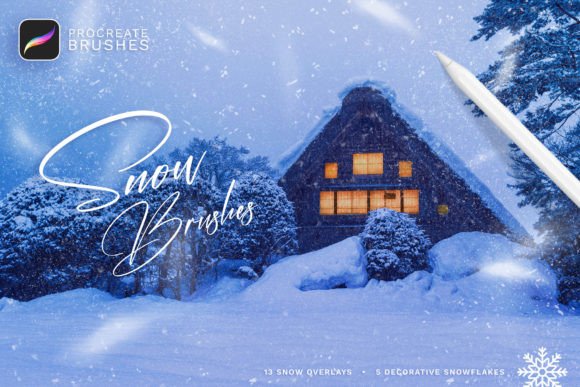
Mastering Winter Art with Snow Procreate Brushes
Creating convincing winter scenes on a digital canvas presents a unique set of challenges for artists. Unlike traditional media, where texture is inherent to the paper or paint, digital art requires specific tools to replicate the complex physics of falling snow, accumulated frost, and intricate ice crystals. For iPad users, Snow Procreate Brushes offer a specialized solution designed to bridge the gap between technical precision and artistic expression. These tools are not merely decorative stamps; they are engineered to help illustrators, concept artists, and hobbyists achieve realistic atmospheric effects with efficiency and ease.
The primary difficulty in drawing snow lies in its variability. Snow can be soft and powdery, sharp and crystalline, or wet and slushy. Capturing this range manually is time-consuming and often results in repetitive patterns that break the viewer's immersion. By integrating Snow Procreate Brushes into your workflow, you gain access to a library that mimics these natural variations. This allows you to focus on composition and lighting rather than getting bogged down in the tedious process of painting individual flakes or texturing large snowy surfaces.
Understanding the Toolkit: Realistic Snow Brushes for iPad Drawing
To fully leverage these tools, it is essential to understand what is included in the package and how each component serves a different artistic purpose. The collection is divided into three distinct categories, each addressing a specific layer of the winter aesthetic. First, the core of the set consists of 18 Procreate brushes focused on realistic snow application. These are designed with pen pressure sensitivity in mind, meaning the opacity, size, and flow of the brush respond dynamically to how hard you press with your Apple Pencil. This feature is critical for creating depth; a light touch might produce a distant, misty flurry, while a firm press creates bold, foreground snowdrifts.
Second, the set includes 13 Snow overlay brushes. Overlays are particularly useful for adding atmosphere to an existing illustration. If you have already completed a landscape or a character portrait but feel it lacks a seasonal context, these overlays allow you to introduce falling snow without disrupting the underlying artwork. They act as a global effect, unifying the scene with a consistent weather pattern. Finally, the 5 Decorative snowflakes provide stylized options for graphic design projects, holiday cards, or whimsical illustrations where photorealism is less important than visual charm.
Solving Common Digital Art Challenges
Many artists struggle with the "flatness" of digital snow. Without proper texture, snow can look like white noise or static rather than a physical substance. Snow Procreate Brushes address this by incorporating complex algorithms that vary the shape and distribution of each stroke. This prevents the dreaded "stamp" look, where every snowflake appears identical. Instead, the brushes generate organic randomness, ensuring that no two strokes look exactly the same. This variability is crucial for maintaining viewer interest and achieving a professional finish.
Another common challenge is the integration of snow with other elements. Snow does not exist in a vacuum; it interacts with light, shadow, and objects. Because these brushes are pressure-sensitive, you can easily adjust the density of the snowfall to match the lighting conditions of your piece. For example, you can create heavier accumulation in shadowed areas and lighter, sparser flakes in highlighted zones. This level of control allows for a more nuanced and believable representation of winter weather.
Practical Applications and Creative Outcomes
The versatility of Snow Procreate Brushes makes them suitable for a wide range of projects. Concept artists working on game environments can use the realistic brushes to quickly block out snowy terrains, establishing mood and scale before moving into detailed rendering. Illustrators creating children’s books can utilize the decorative snowflakes to add playful elements to page borders or chapter headers. Meanwhile, graphic designers can employ the snow overlays to create seasonal marketing materials, social media posts, or website banners that evoke a cozy, wintery feeling.
Consider the process of creating a holiday greeting card. Traditionally, this might involve sourcing stock photos of snow, masking them into your design, and adjusting blend modes—a process that can be cumbersome and limited by the resolution of the stock image. With these brushes, you can paint the snow directly onto your canvas. This gives you complete creative freedom to dictate where the snow falls, how thick it is, and how it interacts with your typography and other design elements. The result is a custom, cohesive design that feels handcrafted rather than assembled.
Installation and Setup Guide
Getting started with Snow Procreate Brushes is straightforward, provided you are using the correct hardware and software. It is important to note that these brushes are compatible ONLY with the Procreate application for Apple iPad. They will not work with Adobe Photoshop, Clip Studio Paint, or any other graphic editing software. This specificity ensures that the brushes are optimized for Procreate’s engine, taking full advantage of its gesture controls and pressure sensitivity features.
To install the brushes, follow these simple steps:
- Download the file directly onto your iPad. Ensure the file is saved in a location accessible via the Files app.
- Locate the file named Snow_ by_Sko4 .brushset.
- Tap on the file. Procreate will automatically launch and install all the brushes.
- Once installed, the brushes will appear at the top of your brush list in Procreate, ready for immediate use.
This seamless installation process means you can go from download to creation in a matter of seconds, minimizing friction and maximizing your creative momentum.
Tips for Maximizing Your Results
To get the most out of Snow Procreate Brushes, consider experimenting with layer blend modes. While the brushes are designed to look good on their own, combining them with layers set to "Screen," "Add," or "Overlay" can enhance the luminosity of the snow, making it glow against darker backgrounds. Additionally, do not hesitate to mix the different brush types within the same piece. You might use the realistic brushes for ground accumulation and the overlay brushes for atmospheric fallout, creating a multi-layered effect that adds significant depth to your artwork.
For those new to digital winter scenes, the included video tutorial is an invaluable resource. It provides step-by-step guidance on how to apply the brushes effectively, demonstrating techniques for varying density, creating motion blur, and integrating snow with existing colors. Watching the tutorial can significantly reduce the learning curve, allowing you to achieve professional results even if you are a beginner.
Conclusion
Incorporating Snow Procreate Brushes into your digital toolkit is a strategic move for any artist looking to enhance their winter-themed creations. By addressing the technical challenges of texture, variation, and atmosphere, these brushes free you to focus on the artistic aspects of your work. Whether you are crafting a realistic landscape, a whimsical holiday card, or a conceptual environment, these tools provide the flexibility and realism needed to bring your vision to life. With easy installation, pressure-sensitive performance, and a comprehensive set of options, they represent a practical and powerful resource for iPad artists seeking to master the art of snow.