Mastering Digital Sketches with Procreate Brushes
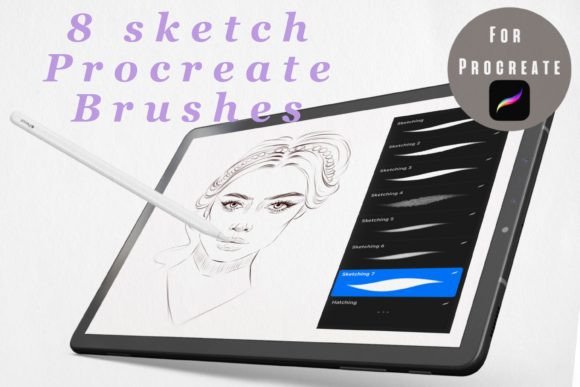
Digital illustration has evolved from a niche hobby into a primary workflow for designers, marketers, and content creators worldwide. At the heart of this shift is the ability to replicate the organic feel of traditional media on a sleek, modern device. Sketch Brushes for Procreate represents a curated collection designed specifically to bridge that gap. This set includes eight distinct sketch brushes engineered to work seamlessly with the iPad and the Procreate app, offering artists a toolkit that feels intuitive, responsive, and authentically tactile.
For professionals who rely on speed and precision, the right tools are not just a luxury—they are a necessity. Whether you are drafting initial concepts for a client pitch, creating rough storyboards for a video campaign, or adding hand-drawn elements to social media graphics, these brushes provide the texture and variability needed to keep your work looking human rather than computer-generated. The appeal lies in their simplicity; they do not overwhelm you with hundreds of unnecessary options. Instead, they offer a focused selection of eight high-quality tools that cover the essential needs of digital sketching.
The Aesthetic and Personality of Hand-Drawn Digital Art
The visual characteristics of Sketch Brushes for Procreate are defined by their imperfection. In a digital landscape often dominated by vector lines and flawless curves, there is a growing demand for assets that convey warmth and authenticity. These brushes mimic the behavior of graphite, charcoal, and ink, introducing subtle grain and pressure sensitivity that reacts naturally to your Apple Pencil movements.
This "handwritten" aesthetic is crucial for building a relatable brand identity. When audiences see perfect, sterile lines, they often perceive the content as corporate or distant. Conversely, sketch-style elements suggest creativity, approachability, and thoughtful craftsmanship. For entrepreneurs and small business owners, incorporating these textures into marketing materials can soften the overall look of a brand, making it feel more accessible and personal. The brushes allow for varied line weights, enabling you to create dynamic visual hierarchy within a single illustration. You can emphasize key features with bold, dark strokes while using lighter, fainter lines for background details or construction guides.
Furthermore, the versatility of this set supports a wide range of artistic styles. From loose, gestural doodles suitable for brainstorming sessions to tighter, more controlled sketches for final presentation boards, the eight included brushes adapt to your hand. This flexibility makes them an invaluable addition to your library of design assets, particularly if you frequently switch between conceptual thinking and polished execution.
Strategic Applications Across Creative Industries
Understanding where to apply these tools can significantly enhance the effectiveness of your creative projects. While they are obviously ideal for illustrators, their utility extends far beyond pure art. Here is how different professionals can leverage Sketch Brushes for Procreate to elevate their work:
- Brand Identity and Logo Design: Many modern brands seek a bespoke, artisanal feel. Using these brushes to draft logo concepts or create custom iconography adds a unique signature that standard fonts cannot match. The organic edges help distinguish a brand in a crowded marketplace.
- Social Media Graphics: In the fast-paced world of Instagram and Pinterest, content that stops the scroll often features unexpected textures. Hand-drawn arrows, frames, or highlight elements created with these brushes can draw attention to specific calls to action or key information in your posts.
- Editorial and Publishing: Bloggers and publishers can use sketch elements to break up text-heavy layouts. A hand-drawn divider or a sketched annotation next to a quote adds visual interest and guides the reader’s eye through the content without the rigidity of traditional graphic elements.
- Packaging Design: For products aiming for a natural, eco-friendly, or handmade vibe, sketch-style illustrations on packaging communicate quality and care. These brushes allow designers to prototype these looks quickly before moving to final production files.
- Web Design and UI Prototyping: Before committing to code, web designers often create wireframes. Using sketch brushes for these early-stage mockups helps stakeholders focus on structure and flow rather than getting distracted by colors and final polish. It signals that the design is still in progress and open to feedback.
The key to successful integration is consistency. If you choose a sketch style for your headers, carry that same visual language through your icons and decorative elements. This creates a cohesive narrative across all touchpoints, reinforcing brand recognition and professionalism.
Practical Guidance for Choosing and Using Sketch Tools
Selecting the right digital brushes is similar to choosing a premium font or a specific typeface for a project. It requires an understanding of your end goal and the medium you are working in. When evaluating Sketch Brushes for Procreate, consider the following practical steps to ensure they fit your workflow:
Evaluate Project Fit: Not every project benefits from a hand-drawn look. Corporate annual reports or high-tech software interfaces may require the cleanliness of a sans serif font or vector graphics. However, for lifestyle brands, educational content, or creative portfolios, the warmth of sketch brushes is unmatched. Ask yourself: Does this project need to feel human and approachable? If yes, these brushes are likely a strong match.
Test Font Pairings and Visual Balance: If you are combining sketched elements with typography, contrast is essential. A rough, textured sketch pairs beautifully with a clean, modern typography choice. Avoid pairing sketch elements with overly decorative script fonts, as this can create visual clutter. Instead, let the sketch be the star and use a simple, legible font for supporting text. This balance ensures readability and maintains a professional appearance.
Understand Pressure Sensitivity: To get the most out of these eight brushes, spend time adjusting your pressure curve settings in Procreate. Every artist holds their stylus differently. Some prefer a light touch, while others press hard. Calibrating your settings ensures that the brushes respond accurately to your natural movement, giving you full control over line weight and opacity.
Check Licensing and Commercial Use: For freelancers and agency owners, verifying licensing terms is critical. Ensure that the brushes you purchase allow for commercial use in client projects. Most reputable brush sets, including this one, are designed for professional use, allowing you to incorporate the resulting artwork into paid deliverables without additional fees. Always review the specific license agreement to protect yourself and your clients.
Iterate and Experiment: Do not be afraid to layer these brushes. Combining a textured pencil brush with a smoother ink brush can create depth and complexity in your drawings. Experiment with blending modes and opacity settings to achieve unique effects that stand out in your portfolio.
In conclusion, Sketch Brushes for Procreate offers more than just a set of digital tools; it provides a pathway to more expressive, engaging, and authentic creative work. By integrating these eight specialized brushes into your daily routine, you can enhance your brand storytelling, streamline your design process, and connect more deeply with your audience. Whether you are a seasoned designer or a hobbyist looking to refine your digital skills, these brushes offer the reliability and character needed to bring your ideas to life on the iPad.