Unlocking Creative Potential with Procreate Background Brushes Set 3
If you have spent any time creating digital art on an iPad, you know that the blank canvas can be both liberating and intimidating. Starting from scratch is great for sketching, but when you need depth, texture, or a specific mood, building a background from zero can eat up hours of your day. This is where a specialized tool like Procreate Background Brushes Set 3 changes the workflow entirely. It is not just about saving time; it is about elevating the visual quality of your work with textures that feel organic and intentional.
Before you dive in, there is one critical technical detail to understand: these brushes are engineered specifically for the Procreate ecosystem. They will only work in Procreate. They will not function in Photoshop, Clip Studio Paint, Affinity Designer, or any other graphics software. This limitation is actually a strength, as it means the brush engines are optimized for Procreate’s unique rendering capabilities, ensuring smooth performance and predictable results on your iPad.
What You Actually Get in the Download
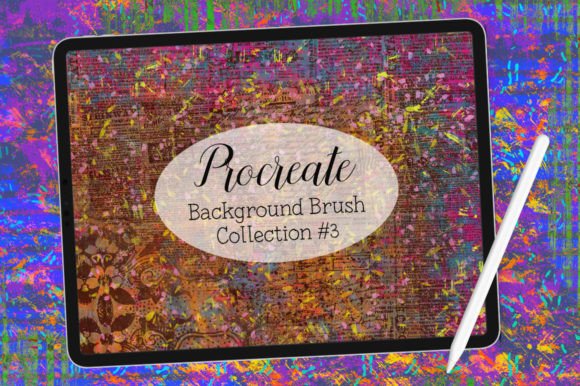
When you purchase this bundle, you are not just getting a single pack of standard textures. The download includes two distinct sets designed to work in harmony. First, you receive the core Background Brushes Set 3, which focuses on layered, atmospheric, and structural backgrounds. Second, you get a bonus set of ten halftone grunge brushes.
The real magic happens when you mix and match these two sets. The background brushes provide the foundation—think soft gradients, paper textures, or abstract washes—while the halftone grunge brushes add edge, contrast, and a retro-print aesthetic. This combination allows you to create complex, multi-layered compositions without needing to import external images or struggle with layer masks manually.
Real-World Applications for Different Creators
Digital tools are only as good as the problems they solve. Here is how different users can integrate these brushes into their daily workflows.
Social Media Managers and Content Creators
In the fast-paced world of Instagram stories, Pinterest pins, and TikTok covers, consistency is key. However, using the same flat color backgrounds can make your feed look stale. With these brushes, you can create a library of branded backgrounds in minutes. Imagine needing a backdrop for a quote graphic. Instead of searching stock photo sites for "textured paper," you can swipe a few strokes with a background brush, add a subtle halftone overlay for grit, and have a unique, copyright-free asset ready in under thirty seconds. This speed allows you to maintain a high posting frequency without sacrificing aesthetic quality.
Educators and Online Course Creators
Teachers and coaches who create digital worksheets, slide decks, or educational videos often struggle to make their materials visually engaging. Flat white slides are functional but rarely memorable. By using these background brushes, educators can add subtle textures to their presentation slides or worksheet headers. The halftone grunge brushes are particularly useful for highlighting key information or creating "sticker-like" emphasis marks that grab students' attention. It transforms dry educational content into something that feels curated and professional.
Freelance Illustrators and Comic Artists
For illustrators, backgrounds are often the most tedious part of the job. You might spend days perfecting a character, only to rush the background because of deadline pressure. This set helps bridge that gap. You can quickly generate atmospheric environments—like a foggy street scene or a sun-drenched room—using the background brushes. Then, use the halftone brushes to add comic-book-style shading or noise, giving the entire piece a cohesive, printed look. This is especially valuable for webcomic artists who need to produce pages weekly.
Small Business Owners and Marketers
If you run an Etsy shop, a bakery, or a consulting firm, you likely create your own marketing materials. Product photography often needs a boost. If you shoot your products on a plain table, you can use Procreate to add a textured background behind the product image (using the eraser or masking tools) to give it a lifestyle feel. Alternatively, use these brushes to design unique packaging labels or business cards that stand out from the generic templates found on Canva. The ability to create custom textures means your brand identity remains unique and unreplicated.
Why the Halftone Grunge Bonus Matters
You might wonder why a set of "grunge" brushes is included with background tools. The answer lies in modern design trends. Clean, vector-style graphics are popular, but there is a growing appetite for "analog" feelings in digital spaces. People crave imperfection. The halftone brushes introduce dots, noise, and irregularities that mimic old newspaper prints or screen printing.
When you layer these over a smooth background, it breaks up the digital perfection. It adds weight and history to the image. For example, a pastel pink background might feel too sweet or childish on its own. Add a dark gray halftone grunge overlay, and suddenly it feels edgy, modern, and sophisticated. This contrast is what makes the artwork feel "endless fun" to experiment with, as noted by the creator.
Considerations Before You Start
While these brushes are powerful, they require a shift in mindset if you are used to traditional painting. Here are a few things to keep in mind to get the most out of your purchase.
- Layer Management: To truly utilize the mix-and-match potential, you need to be comfortable with layers in Procreate. The best results come from stacking multiple brush strokes on separate layers with different blend modes (such as Multiply, Overlay, or Screen).
- Color Theory: These brushes provide texture, not color harmony. You still need to choose a palette that works. A grunge brush in clashing colors will look messy, not artistic. Spend time testing color combinations before committing to a final piece.
- Device Performance: While optimized for Procreate, heavy use of multiple textured layers can tax older iPad models. If you notice lag, try flattening layers periodically or reducing the canvas resolution for drafts.
- Learning Curve: Do not expect to master the set in five minutes. Play with the size, opacity, and streamlining settings. Each brush behaves differently depending on how fast or slow you move your stylus.
Making the Most of Your Investment
The value of Procreate Background Brushes Set 3 is not just in the files themselves, but in the creative freedom they unlock. By removing the friction of creating backgrounds from scratch, you free up mental energy to focus on composition, storytelling, and message. Whether you are designing a flyer for a local event, illustrating a children's book, or simply doodling to relax, these tools provide a sandbox for experimentation.
Remember, these assets are exclusive to the Procreate environment. If you are already invested in the Apple iPad and Procreate ecosystem, this integration is seamless. If you are considering switching from another program, note that you will need to commit to Procreate to use these specific tools. For most mobile-first creators, this is a small price to pay for the convenience and power offered.
Ultimately, the goal is to make your creative process more enjoyable and efficient. By incorporating these background and grunge brushes into your routine, you can produce work that looks polished and professional, without spending your entire day on repetitive texturing tasks. It is about working smarter, not harder, and letting the tools handle the heavy lifting so you can focus on the art.