Unlocking Creative Efficiency with Multi Lines Brushes for Procreate
Digital illustration has evolved rapidly, moving from simple pixel manipulation to complex, layered workflows that mimic—and often surpass—traditional media. For artists working on iPads, the search for tools that streamline repetitive tasks without sacrificing artistic integrity is constant. This is where specialized toolsets like Multi Lines Brushes for Procreate come into play. These are not just standard drawing instruments; they are efficiency engines designed to handle specific structural challenges in line art, pattern design, and decorative illustration.
Before diving into the creative possibilities, it is crucial to address a fundamental technical constraint. IMPORTANT: These brushes are only compatible with the Procreate app for iOS devices. They will not work with other applications or software, such as Photoshop, Clip Studio Paint, or Android-based drawing apps. This exclusivity means that if you are an iPad user deeply embedded in the Apple ecosystem, you have access to a highly optimized tool, but cross-platform users will need to look elsewhere. Understanding this limitation early saves time and ensures you are investing in a resource that fits your specific hardware setup.
Beyond Single Strokes: The Power of Parallel Line Art
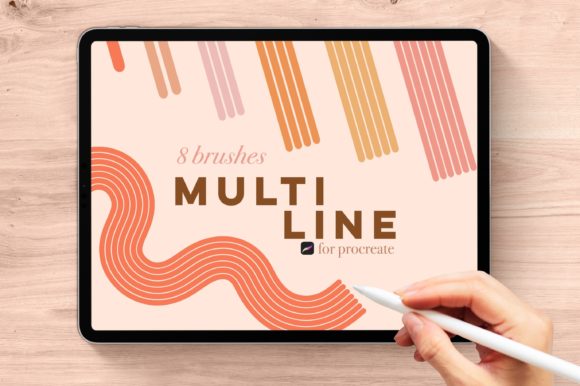
The core concept behind this brushset is deceptively simple yet profoundly impactful. Traditional digital brushing requires you to draw every single line individually. If you are creating a striped shirt, a zebra pattern, or architectural hatching, this means drawing one line, lifting your stylus, moving over, and drawing the next. It is tedious, prone to inconsistency, and breaks the flow of creativity. Multi Lines Brushes for Procreate solves this by allowing you to draw multiple parallel lines simultaneously with a single stroke.
This brushset features original multi-line brushes ranging from a single line up to seven lines in just one brush. This gradient of complexity allows for nuanced control. You aren't forced into a "one size fits all" solution. Instead, you have a spectrum of tools tailored to different densities and visual weights. Let’s look at how these specific brushes translate into real-world applications.
Fashion Illustration and Textile Design
Fashion illustrators often struggle with rendering fabrics. Stripes, plaids, and pinstripes are staples in clothing design, but drawing them manually can result in wobbly, uneven lines that distract from the garment's silhouette. Using the SADIE (1 line) or DANA (2 lines) brushes allows for quick sketching of basic seams and double-stitching effects. However, the real magic happens with TAYLOR (3 lines) and OLIVIA (4 lines). These brushes can instantly create the illusion of woven fabric or tight pinstripes. By adjusting the opacity and size, a designer can lay down the base structure of a plaid shirt in seconds rather than minutes, leaving more time to focus on shading, draping, and color theory.
Architectural Sketching and Urban Planning
For architects and urban sketchers, consistency in line weight and spacing is critical for conveying scale and texture. When sketching building facades, brickwork, or siding, uniformity is key. The KYRA (5 lines) and ELIZA (6 lines) brushes are exceptional for rendering dense textures like corrugated metal, wooden slats, or distant foliage. Instead of painstakingly drawing each slat of a fence, an artist can use a six-line brush to capture the rhythm and density of the structure with a few confident sweeps. This maintains the hand-drawn aesthetic while ensuring the geometric regularity that architectural drawings often require.
Decorative Arts and Zentangle Patterns
Mindful drawing, zentangles, and decorative border designs rely heavily on repetition. Artists in this niche often face fatigue from repetitive motion, which can lead to carpal tunnel strain or inconsistent linework. The BROOKE (7 lines) brush is particularly useful here. It allows for the rapid filling of large areas with dense, parallel patterns. Whether you are creating a mandala background, a book cover border, or intricate hair details in character design, the seven-line brush provides maximum coverage with minimal hand movement. This not only speeds up the workflow but also reduces physical strain during long drawing sessions.
The Bonus Brush: Dynamic Color Interaction
Included in this bundle is a unique bonus brush called BETH. While similar in structure to the Eliza brush, BETH offers a distinct advantage: color-changing capabilities. As you draw, the brush can shift hues or values, adding depth and vibrancy to your lines without needing to switch colors manually. This is particularly effective for creating iridescent effects, rainbow gradients in hair, or dynamic energy lines in comic book art.
However, there is a critical hardware requirement for this specific feature. PLEASE NOTE: This bonus brush only works with an Apple Pencil or iPhone with 3D Touch. If you are using a third-party stylus that lacks pressure sensitivity or tilt recognition, or an older iPad model without Apple Pencil support, the color-changing functionality of BETH will not activate. This is a common consideration for users upgrading their toolkit; ensuring your hardware supports advanced pressure data is essential for unlocking the full potential of premium brush sets.
Choosing the Right Brush for Your Workflow
When integrating Multi Lines Brushes for Procreate into your daily routine, it is helpful to categorize your needs by density. For clean, minimalistic line art, the lower-count brushes like Sadie and Dana are ideal. They offer precision without clutter. For textural work, mid-range brushes like Taylor and Olivia provide a balance between definition and fill. For heavy shading or background patterns, Kyra, Eliza, and Brooke are your go-to tools.
It is also important to remember that these brushes are monoline by nature. This means the line weight remains consistent throughout the stroke, regardless of speed or pressure (unless modified by other settings). This characteristic makes them perfect for graphic design elements, logos, and vector-style illustrations where uniformity is preferred over the organic variation of calligraphic brushes.
Practical Considerations and Limitations
While these brushes significantly enhance productivity, they are not a replacement for foundational drawing skills. Because the lines are generated in parallel, controlling the curvature and flow requires practice. Sharp turns can sometimes result in overlapping lines or gaps if the brush size is too large relative to the curve radius. Users should experiment with brush sizing and stabilization settings in Procreate to find the sweet spot for their specific drawing style.
Additionally, since these brushes are exclusive to Procreate on iOS, users must ensure their device is updated to a version that supports the latest brush engine features. Older versions of Procreate may not render the multi-line spacing correctly, leading to distorted outputs. Always check your app version before purchasing or installing new brush sets.
In conclusion, Multi Lines Brushes for Procreate represents a thoughtful solution to a common digital art bottleneck. By automating the creation of parallel lines, it frees artists to focus on composition, color, and storytelling. Whether you are designing fashion sketches, architectural renders, or intricate patterns, this toolset offers a versatile range of options to suit various creative demands. Just remember to verify your device compatibility, especially for the advanced features of the BETH brush, to ensure a seamless and inspiring creative experience.