Unlocking Creative Efficiency with the Procreate Pattern Brushes II Set
In the rapidly evolving landscape of digital illustration, efficiency is often just as valuable as raw artistic talent. For iPad artists using Procreate, the difference between a project that takes hours and one that takes minutes can frequently be attributed to the tools at their disposal. Among these tools, pattern brushes have emerged as a cornerstone for designers, illustrators, and hobbyists looking to add texture, depth, and intricate detail without the laborious process of manual repetition. The Procreate Pattern Brushes II Set represents a significant expansion in this category, offering a robust library of pre-designed assets that streamline the creative workflow while maintaining high aesthetic standards.
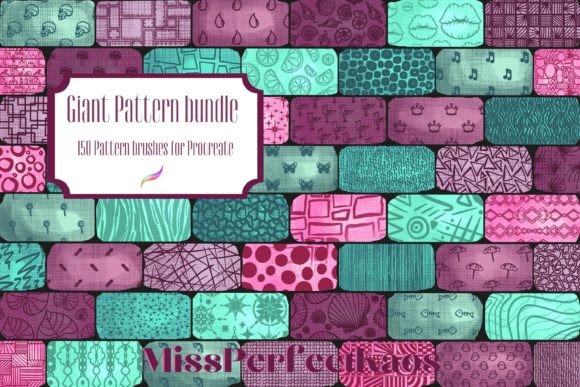
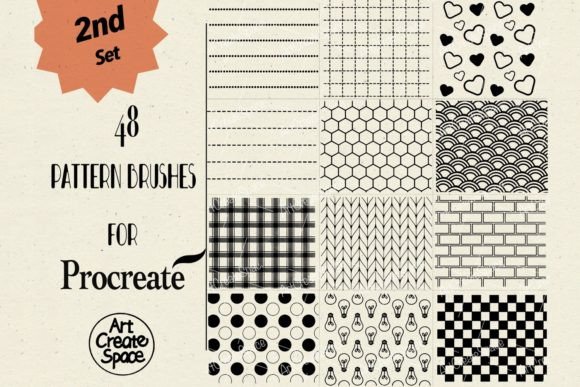
This comprehensive collection is designed to bridge the gap between complex design requirements and intuitive execution. By providing forty-eight distinct pattern brushes in a convenient .brushset format, this resource allows creators to instantly apply sophisticated textures to their work. Whether you are designing packaging, creating digital fabrics, or adding background interest to character illustrations, understanding how to leverage these specific tools can transform your approach to digital art.
The Strategic Advantage of Digital Pattern Brushes
Traditional methods of creating patterns involve drawing a single tile, ensuring it seams perfectly, and then manually repeating it across a canvas. This process is not only time-consuming but also rigid; making changes requires rebuilding the entire pattern. Digital pattern brushes, such as those found in the Procreate Pattern Brushes II Set, operate on a different principle. They utilize Procreate’s brush engine to stamp and stream artwork along a path or across a fill area dynamically.
The primary advantage here is non-destructive flexibility. Artists can adjust the spacing, rotation, and scale of the pattern in real-time. If a design needs to be tighter or more sparse, it is a simple slider adjustment rather than a complete redraw. This immediacy encourages experimentation. A designer might try five different variations of a floral border in the time it would previously take to sketch one. This iterative freedom is crucial for professionals working under tight deadlines and for educators teaching the principles of design, as it allows students to focus on composition and color theory rather than the mechanics of repetition.
Versatility Across Creative Disciplines
The utility of this brush set extends far beyond simple decoration. Its applications are diverse, catering to a wide spectrum of creative industries. For fashion designers, these brushes can simulate fabric textures like lace, knitwear, or embroidery, allowing for rapid prototyping of garment designs. In the realm of stationery and greeting card design, the forty-eight included patterns provide an immediate library of borders, backgrounds, and frames that can be customized to fit any theme.
Furthermore, concept artists and game developers find immense value in these tools for environment design. Quickly laying down brickwork, foliage, or tiled flooring helps establish the mood and scale of a scene without getting bogged down in minute details during the early stages of production. The Procreate Pattern Brushes II Set thus serves as a foundational toolkit for both finished commercial products and preliminary conceptual sketches.
Technical Specifications and Compatibility
Understanding the technical framework of these digital assets is essential for proper implementation. The Procreate Pattern Brushes II Set is delivered as a compressed Zip file containing a single .brushset file. This format is native to the Procreate ecosystem, ensuring seamless integration with the app’s existing library management system. Upon downloading, users simply tap the file, and it automatically imports into their Procreate brush collection, organized for immediate access.
It is critical to note the specific hardware and software requirements for these tools. These are digital brushes engineered exclusively for the Procreate App for iPad used in conjunction with the Apple Pencil. They will not function in Adobe Photoshop, Clip Studio Paint, or any other desktop-based software applications. This limitation is due to the proprietary nature of Procreate’s brush engine, which interprets the data within the .brushset file to control stroke behavior, pressure sensitivity, and texture mapping. Users attempting to import these files into other programs will encounter errors, as the file structure is not universally compatible across all digital art platforms.
For professionals who work across multiple platforms, this necessitates a workflow centered around the iPad. However, for many modern creators, the iPad has become a primary workstation rather than a secondary device. The portability and power of the iPad Pro, combined with the precision of the Apple Pencil, make it an ideal environment for utilizing these pattern brushes. The tactile experience of drawing patterns directly on the screen offers a level of control and intuition that mouse-and-keyboard setups often lack.
Workflow Integration: From Import to Application
Integrating the Procreate Pattern Brushes II Set into your daily routine involves a straightforward yet powerful workflow. Once the forty-eight brushes are imported, they appear in your brush library, typically grouped under the set name. Organizing them into a dedicated folder within Procreate can help maintain a clean workspace, especially if you manage multiple brush libraries.
- Selection: Choose the appropriate pattern brush based on the desired texture or motif. With forty-eight options, ranging from geometric shapes to organic forms, there is likely a brush that aligns closely with your project’s aesthetic.
- Customization: Access the Brush Studio to tweak parameters. You can adjust the spacing to create a continuous line or a dotted effect, change the size to fit the scale of your illustration, and modify the opacity for subtle background textures.
- Application: Use the Apple Pencil to draw. The brushes respond to pressure and tilt, allowing for dynamic variation in the pattern’s appearance. For example, pressing harder might increase the density of the pattern, while tilting the pencil could alter the angle of the stamped elements.
- Refinement: Utilize Procreate’s layer modes to blend the pattern with underlying colors. Multiply mode can darken the pattern for shadow effects, while Screen mode can lighten it for highlights. Clipping masks allow you to restrict the pattern to specific shapes, ensuring clean edges without manual erasing.
This workflow emphasizes speed and precision. By mastering these steps, creators can produce complex, textured artworks in a fraction of the time required by traditional methods. The ability to quickly iterate and refine designs leads to higher quality outcomes and greater client satisfaction.
Enhancing Artistic Depth and Texture
One of the most compelling aspects of using pattern brushes is the ability to add visual interest without cluttering the composition. A flat color field can often feel sterile or unfinished. Applying a subtle pattern from the Procreate Pattern Brushes II Set can introduce a sense of materiality and depth. For instance, a slight paper texture overlay can make a digital illustration feel more organic and handcrafted. Similarly, intricate lace patterns can add elegance to portrait backgrounds without distracting from the main subject.
Educators and researchers in digital media often highlight the importance of texture in visual communication. Textures convey information about surface quality, weight, and context. By providing a diverse array of pre-made textures, this brush set empowers artists to communicate these qualities effectively. It allows for a richer visual language, where every element contributes to the overall narrative of the piece.
Considerations for Professional Use
While the convenience of pattern brushes is undeniable, professional users must consider licensing and originality. When using pre-made assets in commercial projects, it is important to ensure that the final design is sufficiently transformed to be considered original work. Simply applying a pattern brush may not constitute enough creative input for copyright protection in some jurisdictions. Therefore, these brushes are best used as building blocks within a larger, unique composition.
Additionally, over-reliance on preset patterns can lead to a homogenized look. To maintain a distinct artistic voice, creators should combine these brushes with custom elements, hand-drawn details, and unique color palettes. The Procreate Pattern Brushes II Set should be viewed as a tool to enhance creativity, not replace it. By mixing these automated patterns with manual techniques, artists can achieve a balance between efficiency and individuality.
For business owners and marketing teams, investing in such tools can streamline content creation. Social media graphics, promotional materials, and product mockups can be produced more rapidly, allowing for more frequent and consistent brand presence. The cost-effectiveness of digital brushes compared to hiring specialized texture artists or purchasing stock images makes them an attractive option for small businesses and startups.
Conclusion: Elevating Digital Craftsmanship
The Procreate Pattern Brushes II Set offers a compelling solution for modern digital creators seeking to enhance their workflow. With forty-eight versatile brushes delivered in a user-friendly .brushset format, it provides immediate access to a wide range of textures and patterns. While restricted to the Procreate app on iPad with Apple Pencil, this specificity ensures optimal performance and integration within a powerful mobile creative suite.
By understanding the technical requirements and exploring the diverse applications of these tools, artists, designers, and educators can unlock new levels of productivity and artistic expression. Whether used for rapid prototyping, detailed illustration, or educational demonstrations, these pattern brushes serve as a valuable asset in the digital artist’s toolkit. Embracing such tools allows creators to focus less on repetitive tasks and more on the innovative and expressive aspects of their craft, ultimately leading to more engaging and professionally polished results.