Mastering Color and Texture with Procreate Blending Brushes
Digital art often suffers from a sterile, overly clean aesthetic. While crisp lines have their place, the soul of a painting usually lives in the transitions—the soft gradient of a sunset, the subtle shadow under an eye, or the chaotic mix of oil paints on a canvas. This is where Procreate Blending Brushes become indispensable. Unlike standard brushes that deposit new pigment onto your layer, blending tools interact with the colors already present. They smudge, pull, mix, and soften existing strokes, mimicking the physical act of using a finger, a tortillon, or a dry brush to manipulate wet media.
For artists working on iPad or iPad Pro, understanding the nuance between a low-intensity blend and a dramatic, high-intensity smear can transform a flat illustration into a expressive piece of art. The right set of blending brushes does not just smooth edges; it creates texture, depth, and realism that feels organic rather than algorithmic.
The Spectrum of Blend: From Subtle to Dramatic
Not all blending needs are created equal. A portrait artist requires precision and subtlety, while an abstract expressionist might want to drag colors across the canvas in sweeping, chaotic motions. A versatile collection of Procreate Blending Brushes typically ranges from gentle softeners to aggressive mixers. Understanding this spectrum allows you to choose the right tool for the specific job at hand.
Low-Intensity Blends for Precision Work
When working on portraits, heavy-handed blending can destroy the delicate details of facial features. Low-intensity brushes are designed for control. They allow you to gently soften the transition between skin tones without erasing the underlying structure. For example, when rendering eyelids, a subtle blend can create the illusion of thin, translucent skin over the bone structure. Similarly, for makeup application in digital character design, these brushes let you diffuse eyeshadow or blush naturally, ensuring it looks like it sits on the skin rather than floating above it.
These brushes are also essential for contouring. By lightly pulling darker shades into lighter mid-tones, you can sculpt cheekbones, noses, and jaws with a realism that hard edges simply cannot achieve. The key here is patience; low-intensity blends require multiple passes, giving you the time to assess the form as you work.
High-Intensity Blends for Expressive Painting
On the other end of the spectrum are high-intensity blending brushes. These tools move large amounts of pixel data quickly, creating dramatic, exaggerated effects. They are ideal for landscapes, seascapes, and abstract backgrounds where you want colors to bleed into one another organically. Imagine painting a stormy sky; a high-intensity blend can take distinct strokes of grey, blue, and white and churn them together to create the turbulent look of moving clouds. This "wet-on-wet" digital effect saves hours of manual gradient work and adds a sense of energy and movement to the piece.
Texture Matters: Soft, Grainy, and Wiry Blends
One common mistake beginners make is assuming all blenders should be smooth. In traditional media, blending tools have texture. A paper towel leaves a different mark than a stiff bristle brush. Digital blending brushes should replicate this variety to maintain the integrity of your artwork’s texture.
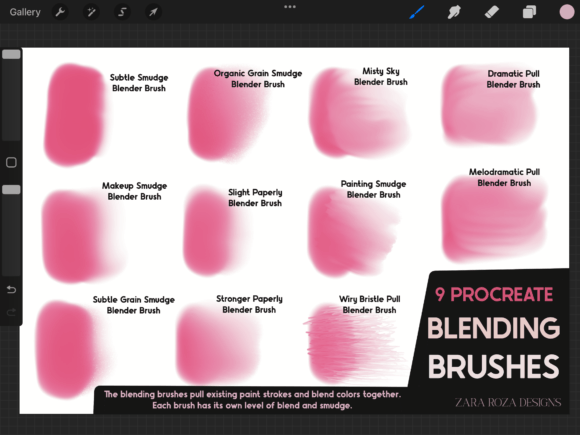
- Smooth Soft Blend: These are your go-to tools for airbrushed looks, skin retouching, and seamless gradients. They remove grain and noise, creating a polished, almost photographic finish. Use these sparingly on textured pieces, as they can flatten the visual interest if overused.
- Grainy Blend: These brushes preserve the tooth of the canvas. When you blend with a grainy tool, it mixes the colors but leaves behind a speckled, organic texture. This is perfect for pastel drawings, charcoal sketches, or any style where you want to retain a hand-drawn feel. It prevents the "plastic" look that often plagues digital art.
- Wiry/Oil Paint Feel: Perhaps the most exciting addition to any brush set is the wiry blend. This tool mimics the stiffness of hog hair bristles used in oil painting. It doesn't just smooth; it drags and pulls the paint, leaving visible stroke marks and directional flow. This is invaluable for impasto styles, where the direction of the brushstroke contributes to the form. Using a wiry blend on a landscape can suggest the flow of wind through grass or the current of water, adding a dynamic narrative element to the static image.
Real-World Applications Across Industries
The utility of Procreate Blending Brushes extends far beyond hobbyist illustration. Professionals in various creative industries rely on these tools to streamline their workflows and enhance the quality of their output.
Character Design and Concept Art
Concept artists often need to iterate quickly. Blending brushes allow for rapid exploration of lighting and mood. Instead of carefully selecting new colors for every shadow, an artist can lay down base shapes and use blending tools to push and pull light sources. This method is faster and often results more happy accidents and natural color harmonies. For character faces, the ability to subtly blend skin tones ensures that characters look alive and three-dimensional, avoiding the mask-like appearance of unblended cel-shading.
Fashion Illustration
In fashion design, fabric texture is paramount. A satin dress requires a different blending approach than a wool sweater. Smooth blends can create the sleek, reflective highlights of silk, while grainy or wiry blends can simulate the fuzzy, matte surface of knits. Designers use these tools to drape fabric digitally, blending shadows to show how cloth folds and wraps around the body. The ability to smudge colors allows for quick adjustments to pattern placement and color blocking without redrawing entire garments.
Book Cover and Editorial Illustration
Editors and publishers often look for covers that evoke emotion. Atmospheric effects—fog, rain, dust, or dreamlike hazes—are best achieved with blending brushes. A high-intensity blend can create a mysterious fog rolling over a landscape, while a soft blend can soften the background to make the title text pop. These tools help illustrators create depth of field, guiding the viewer’s eye to the focal point by blurring peripheral details.
Choosing the Right Tool for Your Workflow
Before diving into a new set of Procreate Blending Brushes, consider your typical workflow. Do you prefer building up layers of color, or do you like to paint alla prima (all at once)? If you work in layers, you may prefer softer blends that don’t pull color from underlying layers too aggressively. If you paint on a single layer, you will need robust, high-intensity blenders that can handle heavy mixing.
It is also important to remember that blending is destructive in a sense. Once you smudge pixels, the original hard edge is gone. Therefore, many professionals recommend keeping a backup layer or using the undo function liberally during the experimentation phase. Start with low intensity and build up. It is easier to add more blend than it is to recover lost detail.
Additionally, consider the resolution of your canvas. High-intensity blends can behave differently on a 4K canvas versus a smaller sketch. Test your brushes at the final output size to ensure the texture and intensity meet your expectations. A brush that looks subtle on a small screen might appear overly aggressive when zoomed in for print-quality work.
Enhancing Your Digital Toolkit
Investing in a curated set of blending tools is about more than just convenience; it is about expanding your artistic vocabulary. With a package that includes nine specialized digital brushes plus extra bonuses, you gain access to a range of textures and intensities that would take months to configure manually. Whether you are looking to refine the pores on a hyper-realistic portrait or churn up a violent seascape, having the right blender at your fingertips allows you to focus on creativity rather than technical setup.
Remember, these are digital files intended for immediate use within the Procreate app on iPad or iPad Pro. There is no physical product shipped, allowing for instant access to your new tools. By integrating these smudge, mix, and pull capabilities into your routine, you bridge the gap between digital precision and traditional painterly freedom. Happy drawing, and may your blends be ever smooth.