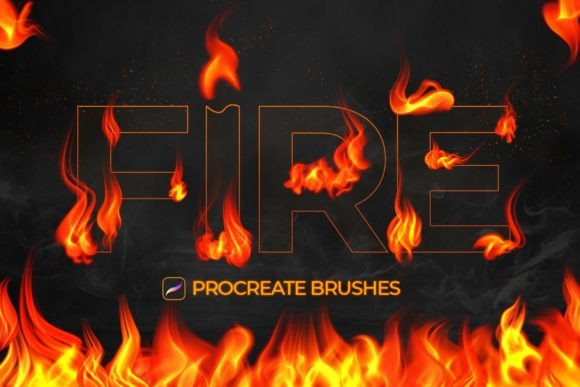
Mastering Realistic Flames with Fire Procreate Brushes
Digital illustration has evolved significantly, moving from flat vector shapes to complex, textured compositions that mimic the physical world. Among the most challenging elements to render convincingly is fire. It is dynamic, translucent, and constantly changing shape. For artists working on the iPad, achieving this level of realism without spending hours on manual blending can be a significant bottleneck. This is where specialized tools like Fire Procreate Brushes become essential assets in a digital artist’s toolkit. Designed specifically for the Procreate application, this collection offers a streamlined approach to integrating realistic flame effects into artwork, photography, and graphic design projects.
The primary value proposition of this brush set lies in its ability to bridge the gap between technical skill and efficient workflow. While a skilled painter can certainly create fire from scratch using standard round brushes and layer modes, the process is time-consuming. Fire Procreate Brushes provides twelve distinct variations that handle the complex texturing and opacity gradients inherent to flames. This allows creators to focus more on composition and lighting rather than getting bogged down in the minutiae of individual flame tongues.
Understanding the Core Features
At its heart, this package includes twelve unique brushes, each engineered to produce a different type of fire effect. The diversity here is crucial because "fire" is not a monolithic visual element. A candle flame differs vastly from a bonfire, which in turn looks nothing like a magical spell effect or an industrial explosion. By offering twelve different presets, the set acknowledges these nuances. Users are not forced to stretch a single brush to fit every scenario; instead, they can select the tool that best matches the intensity and scale of the fire they wish to depict.
One of the standout technical features is the integration of pressure sensitivity. In digital art, static stamps often look artificial because they lack the organic variation found in hand-drawn lines. These brushes respond dynamically to the Apple Pencil. When you apply light pressure, the brush deposits a thinner, more transparent line, ideal for the wispy edges of smoke or the faint glow of embers. Increasing the pressure results in a thicker, more opaque stroke, perfect for the dense, bright core of a flame. This responsiveness ensures that every stroke feels natural and retains the artist's personal touch, preventing the artwork from looking like it was generated by a filter.
Furthermore, the brushes are fully compatible with Procreate’s color dynamics. While traditional fire is associated with reds, oranges, and yellows, creative projects often require stylized interpretations. You can easily switch the brush color to blue, purple, green, or white to create magical flames, alien environments, or abstract concepts. The underlying texture and blending modes of the brushes remain effective regardless of the hue chosen, providing immense flexibility for fantasy illustrators and concept artists.
Workflow Efficiency and Usability
For professionals and freelancers, time is a tangible resource. The ease of use offered by Fire Procreate Brushes directly impacts productivity. The installation process is straightforward for anyone familiar with Procreate: import the .brushset file, and the tools appear instantly in your brush library. There is no complex setup or external plugin required. Once installed, the learning curve is minimal. Because the brushes leverage Procreate’s native engine, they behave predictably. You simply select the brush, choose your color, and paint over the desired area.
This simplicity does not come at the cost of customization. Experienced users can dive into the brush settings to tweak size limits, opacity jitter, or scattering if they need a highly specific look. However, for most users, the default settings are optimized to deliver high-quality results immediately. This balance between "ready-to-use" convenience and deep customizability makes the set suitable for both beginners who want quick wins and advanced artists who need a reliable base to modify.
In practical terms, consider a photographer editing a portrait who wants to add a dramatic lighting effect. Using these brushes, they can paint flames around the subject on a new layer set to "Add" or "Screen" mode. The realistic texture of the brush interacts with the underlying photo, creating a believable integration of light and heat. Similarly, a character designer sketching a pyromancer can quickly block in flame effects to visualize the character’s power without disrupting the flow of the drawing session.
Quality and Visual Consistency
The visual quality of digital brushes is determined by their texture resolution and how they handle transparency. Low-quality fire brushes often look like repetitive stickers, with obvious patterns that break immersion. Fire Procreate Brushes avoids this pitfall by utilizing high-resolution textures that vary subtly with each stroke. The edges of the flames are soft and irregular, mimicking the turbulent nature of combustion. The internal gradients transition smoothly from the bright white-hot center to the cooler, darker outer edges.
Consistency is another critical factor. When creating a large fire, an artist needs to layer multiple strokes. If the brushes do not blend well with themselves, the result can look muddy or cluttered. These brushes are designed to stack cleanly. As you layer strokes, the density increases naturally, allowing you to build up volume and intensity gradually. This layering capability is essential for creating depth, making the fire appear three-dimensional rather than flat.
Target Audience and Ideal Use Cases
Who benefits most from this tool? The audience is broad, ranging from hobbyists to commercial professionals. Illustrators and Concept Artists will find it invaluable for fantasy and sci-fi projects where elemental effects are common. Graphic Designers working on promotional materials, such as concert posters or product launches, can use these brushes to add energy and excitement to static layouts. Photographers and Photo Manipulators can enhance portraits or landscape shots with realistic fire overlays without needing to source and mask external stock images.
Educators and content creators also stand to gain. Creating engaging thumbnails or educational diagrams involving heat, energy, or chemistry becomes faster and more visually appealing. Even small business owners managing their own social media presence can use these brushes to create eye-catching graphics for seasonal promotions or brand storytelling.
Limitations and Technical Requirements
It is important to address the limitations clearly to manage expectations. First and foremost, Fire Procreate Brushes is compatible only with the Procreate application on Apple iPad. It will not work with Adobe Photoshop, Clip Studio Paint, Procreate Pocket on iPhone, or any desktop-based software. This is a hardware and software-specific asset. Users must own an iPad capable of running Procreate and an Apple Pencil (or a compatible stylus) to fully utilize the pressure sensitivity features.
Additionally, while these brushes provide a realistic base, they are not a substitute for understanding light and physics. To achieve the best results, users should still apply fundamental artistic principles. This includes using appropriate layer blending modes, adding glow effects, and considering how the fire illuminates surrounding objects. The brushes provide the texture and shape, but the artist must provide the context and lighting logic.
Final Verdict on Value
In the crowded marketplace of digital art assets, Fire Procreate Brushes distinguishes itself through specificity and reliability. It solves a specific problem—rendering convincing fire—with a focused, high-quality solution. The inclusion of twelve varied effects ensures versatility, while the pressure-sensitive design maintains the organic feel of hand-drawn art. For iPad artists looking to enhance their workflow and expand their visual vocabulary, this brush set represents a practical investment. It reduces the technical friction of painting complex elements, allowing creativity to take center stage. Whether you are crafting a epic fantasy scene or adding a subtle spark to a photo edit, these tools provide the control and realism needed to execute your vision effectively.