Mastering Visual Composition with Text Collage Photoshop Brushes
In the rapidly evolving landscape of digital design, the demand for unique, textured, and layered visual elements has never been higher. Designers across industries—from advertising agencies to independent content creators—are constantly seeking tools that bridge the gap between traditional analog aesthetics and modern digital efficiency. One such tool that has gained significant traction is the specialized set of Text Collage Photoshop Brushes. These resources offer a sophisticated method for integrating typographic elements into complex compositions without the tedious manual labor typically associated with collage art.
This comprehensive guide explores the technical specifications, creative applications, and strategic advantages of utilizing these specific brush sets. By understanding how to leverage these 30 distinct brushes, designers can elevate their workflow, create compelling abstract backgrounds, and produce professional-grade texture overlays with unprecedented ease.
The Technical Foundation: Understanding Brush Specifications
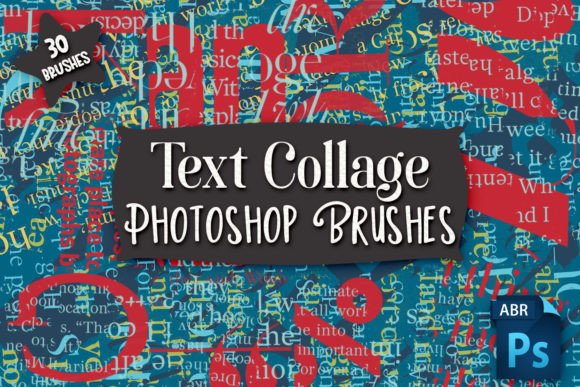
To fully appreciate the utility of any digital asset, one must first understand its technical underpinnings. This particular collection consists of 30 different text collage Photoshop brushes, meticulously crafted to provide variety and depth. The files are delivered in the standard Adobe Photoshop .abr format, ensuring seamless integration into existing libraries for users of the software.
A critical feature of this set is the resolution quality. The brushes range in size from 5000 pixels to 3302 pixels. In the context of digital design, this high-resolution capability is paramount. Many free or low-quality brush sets suffer from pixelation when scaled up for large-format prints or high-definition screens. However, with a maximum dimension of 5000 pixels, these brushes retain crisp edges and detailed textures even when applied to expansive canvases. This makes them suitable not only for web graphics but also for print media, such as posters, magazine spreads, and packaging designs where clarity is non-negotiable.
It is important to note a key compatibility constraint: the brushes will only work in Photoshop. This limitation is inherent to the .abr file structure, which is proprietary to Adobe. However, the developers have accounted for users who prefer alternative software ecosystems. Included with the download are transparent PNG files for each brush. These PNGs serve as universal stamps that can be imported into programs like Procreate, Affinity Photo, GIMP, or Clip Studio Paint. This dual-format approach ensures that the creative potential of the text collage elements is accessible to a broader audience, regardless of their preferred digital workspace.
Creative Applications and Use Cases
The versatility of text collage brushes extends far beyond simple decoration. They are powerful tools for constructing narrative depth and visual interest. Below are several primary applications where these brushes excel.
Creating Unique Backgrounds
One of the most immediate benefits of using this set is the ability to generate complex backgrounds quickly. Traditional background creation often involves hours of layering, masking, and blending. With these brushes, a designer can stamp varied typographic fragments onto a canvas, adjusting opacity and blend modes to create a rich, chaotic, yet controlled backdrop. This technique is particularly effective in editorial design, where the background needs to support text without competing with it. By using the transparent nature of the PNGs or the dynamic pressure sensitivity of the Photoshop brushes, artists can build layers that feel organic and handcrafted.
Texture Overlays for Depth
Flat design has its place, but there is a enduring appreciation for tactile visuals. These text collage brushes act as exceptional texture overlays. When applied over photographs or solid color fields, they introduce a gritty, urban, or vintage aesthetic depending on the specific brush selected. For instance, overlaying a distressed text fragment on a portrait can add an emotional layer of complexity, suggesting themes of memory, communication, or decay. The high resolution ensures that these textures remain subtle and refined rather than appearing blocky or artificial.
Abstract Artwork and Experimental Design
For fine artists and experimental designers, these brushes open doors to abstract expressionism. By manipulating the scale, rotation, and color of the text elements, users can create compositions that prioritize form and rhythm over literal readability. The 30 different variations allow for a diverse vocabulary of shapes. Some may resemble architectural structures, while others might mimic natural patterns. This flexibility encourages users to break away from conventional layout grids and explore more fluid, dynamic arrangements. The resulting artwork can serve as standalone pieces, album covers, or conceptual visuals for branding campaigns.
Workflow Efficiency and Professional Advantages
Beyond the aesthetic outcomes, the adoption of Text Collage Photoshop Brushes offers tangible improvements to workflow efficiency. In a professional setting, time is a critical resource. Manually cutting out text from magazines, scanning them, and cleaning up the edges—a traditional collage method—can take hours per project. Digital brushes replicate this analog feel in seconds.
- Rapid Iteration: Designers can test multiple compositional ideas quickly. If a certain arrangement does not work, it can be undone or adjusted instantly, allowing for greater creative risk-taking.
- Consistency: Using a cohesive set of 30 brushes ensures that all typographic elements share a similar stylistic DNA. This consistency is crucial for maintaining brand identity or thematic unity across a series of designs.
- Non-Destructive Editing: When used as smart objects or on separate layers in Photoshop, these brushes allow for non-destructive editing. Colors, sizes, and positions can be tweaked at any stage of the project without compromising the original asset quality.
Furthermore, the inclusion of transparent PNGs facilitates collaboration. A team member using different software can still contribute to the project by importing the PNG assets, ensuring that the workflow remains uninterrupted by technical incompatibilities.
Best Practices for Implementation
To maximize the potential of these tools, users should adhere to certain best practices. First, always review the previews provided with the download. Understanding the specific character of each of the 30 brushes helps in selecting the right element for the right context. Some brushes may be denser and better suited for bold statements, while others might be lighter and ideal for subtle texturing.
Second, experiment with blend modes. In Photoshop, changing a layer’s blend mode from "Normal" to "Multiply," "Overlay," or "Screen" can dramatically alter how the text collage interacts with underlying images. This step is essential for achieving a seamless integration where the brush strokes appear to be part of the original photograph or illustration.
Third, consider color theory. While the brushes may come in black or white by default, recoloring them to match a specific palette can unify the design. Using complementary colors for the text collage against the background can create vibrancy, while monochromatic schemes can evoke sophistication and minimalism.
Considerations for Different User Groups
The utility of these brushes varies across different user segments. For professional graphic designers, they are a time-saving asset that adds a bespoke touch to client work. For educators and students, they serve as an excellent teaching tool for demonstrating principles of layering, composition, and texture. Hobbyists and digital artists will find them accessible due to the included PNGs, allowing for creative exploration without a steep learning curve in advanced Photoshop techniques.
Business owners and marketers can also benefit indirectly. By enabling their internal creative teams or freelance partners to produce higher-quality visuals more quickly, these tools contribute to faster turnaround times for marketing materials, social media content, and brand assets. The unique look provided by text collage styles can help brands stand out in crowded digital feeds, offering a distinct visual identity that resonates with audiences seeking authenticity and artistic flair.
Conclusion: Elevating Digital Design
The integration of Text Collage Photoshop Brushes into a designer’s toolkit represents a convergence of artistic tradition and digital innovation. With their high-resolution capabilities, versatile file formats, and diverse stylistic options, these 30 brushes provide a robust foundation for creating unique backgrounds, texture overlays, and abstract artwork. Whether you are a seasoned professional looking to streamline your workflow or a hobbyist eager to explore new creative avenues, these tools offer the flexibility and quality needed to produce compelling visual narratives. By mastering these assets, creators can push the boundaries of their digital compositions, delivering work that is both visually striking and technically proficient.