Mastering Dynamic Effects with Photoshop Burst Brushes
Creating high-impact visual designs often requires more than just standard shapes and solid colors. Whether you are designing a social media post, a promotional flyer, or digital art, adding elements of motion and energy can significantly enhance viewer engagement. This is where specialized tools like Photoshop Burst Brushes become invaluable. These digital assets allow creators to simulate explosive effects, radial bursts, and dynamic light patterns with just a few clicks, saving hours of manual drawing time.
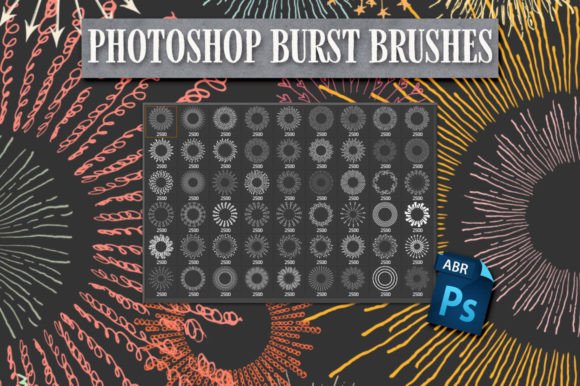
At their core, these brushes are pre-configured digital stamps that replicate the look of sudden expansion or impact. Unlike basic round brushes, burst brushes feature intricate details such as rays, shards, splatters, or glowing lines that radiate from a central point. The specific set discussed here offers a robust collection of these effects, each crafted at a substantial 2500 pixels in size. This high resolution ensures that whether you are working on a small web banner or a large-format print, the edges remain crisp and the details stay sharp without pixelation.
Why High-Resolution Matters in Digital Design
One of the most critical aspects of any digital brush set is its resolution. Many free or low-quality brush packs offer assets that are only 500 or 1000 pixels wide. While these might suffice for small web icons, they quickly break down when scaled up for professional projects. With brushes sized at 2500 pixels, you have the flexibility to scale them down for subtle background textures or use them at full size for dominant foreground elements. This versatility is crucial for professionals who need to maintain quality across various mediums, from Instagram stories to large trade show banners.
The clarity provided by this resolution means you can apply layer styles, such as outer glows, drop shadows, or color overlays, without losing definition. For marketers and entrepreneurs, this means your branded content looks polished and premium, reinforcing trust with your audience. For hobbyists and educators, it provides a forgiving workspace where mistakes can be corrected without the image becoming blurry or distorted.
Practical Applications for Creators and Businesses
The utility of Photoshop Burst Brushes extends far beyond simple comic book effects. Here are several realistic scenarios where these tools can elevate your work:
- Social Media Marketing: In the fast-scrolling environment of platforms like Instagram and TikTok, static images need to grab attention immediately. Using a burst effect behind a product photo or a sale announcement creates a focal point that draws the eye directly to the key message.
- Event Promotions: Flyers for concerts, parties, or grand openings benefit from the energy implied by explosive graphics. A well-placed burst can suggest excitement, celebration, and high energy, setting the tone for the event before the reader even processes the text.
- Digital Art and Illustration: Artists can use these brushes to create magical spells, superhero impacts, or sci-fi weapon effects. Because the brushes are contained in a single .abr file, switching between different burst styles is seamless, allowing for rapid experimentation during the creative process.
- Web Design Elements: Bloggers and web designers can use subdued burst effects as background elements to break up text-heavy sections or to highlight call-to-action buttons. The key is adjusting the opacity to ensure the effect supports rather than overwhelms the content.
Getting Started: Installation and Usage
For those new to Adobe Photoshop, integrating new brushes might seem daunting, but the process is straightforward. Your download includes one Photoshop .abr file that contains all of the brushes shown in the previews. To use them, you must have Photoshop installed and know how to load an .abr file into the application.
Here is a simple workflow to get you started:
- Locate the File: After downloading, find the .abr file on your computer. It is helpful to save it in a dedicated folder for your design assets so you can easily find it later.
- Load into Photoshop: Open Photoshop and select the Brush Tool. Click on the brush preset picker in the top options bar. Look for the gear icon or the menu option that says "Import Brushes." Navigate to your saved .abr file and select it.
- Adjust Settings: Once loaded, the brushes will appear in your brush panel. Select a burst brush and click on your canvas. You can adjust the size using the bracket keys ([ and ]) and change the color by selecting a new foreground color.
- Experiment with Blending Modes: To make the bursts integrate naturally with your background, try changing the layer blending mode. Modes like "Screen," "Overlay," or "Color Dodge" often work well for light-based effects, while "Multiply" can be useful for darker, shadowy bursts.
Important Considerations for Best Results
While these brushes are powerful, they are not a magic solution for every design problem. Understanding their limitations and best practices will help you achieve professional results. First, remember that these are static images. If you need animated explosions for video, you will need to animate these layers in After Effects or use video-specific tools. However, they serve as excellent base frames for such animations.
Secondly, context is key. A burst brush should support the narrative of your design. If you are creating a calm, minimalist brand identity, aggressive explosive brushes may clash with the intended mood. Always consider the emotional response you want to evoke. For softer effects, reduce the opacity of the brush layer or apply a Gaussian Blur to soften the edges.
Additionally, file management is essential. Since the .abr file contains multiple brushes, it can be easy to lose track of which brush creates which effect. Take a moment to test each brush on a blank canvas and save a reference sheet. This practice saves time in future projects when you need a specific look quickly.
Enhancing Your Creative Workflow
Incorporating Photoshop Burst Brushes into your toolkit is about more than just adding flashy effects; it is about efficiency and consistency. By using pre-made, high-quality assets, you reduce the time spent on repetitive tasks and focus more on composition and storytelling. For freelancers and small business owners, this efficiency translates directly into better productivity and the ability to take on more projects.
Moreover, these brushes encourage experimentation. When you have a variety of shapes and styles at your fingertips, you are more likely to try new layouts and design concepts. This playful exploration can lead to unique visual styles that set your work apart from competitors who rely on standard stock photos or generic templates.
Ultimately, the value of this brush set lies in its balance of quality and ease of use. With high-resolution assets and a simple installation process, it empowers users of all skill levels to add professional-grade dynamic effects to their work. Whether you are a seasoned designer looking to speed up your workflow or a beginner eager to learn the ropes of digital composition, these brushes provide a reliable foundation for creating impactful visuals.
As you begin to use these tools, remember that mastery comes with practice. Start by mimicking designs you admire, then gradually develop your own style. Pay attention to lighting, perspective, and color harmony to ensure your burst effects look integrated and natural. With patience and creativity, you will find that these simple digital stamps can transform ordinary designs into extraordinary visual experiences.