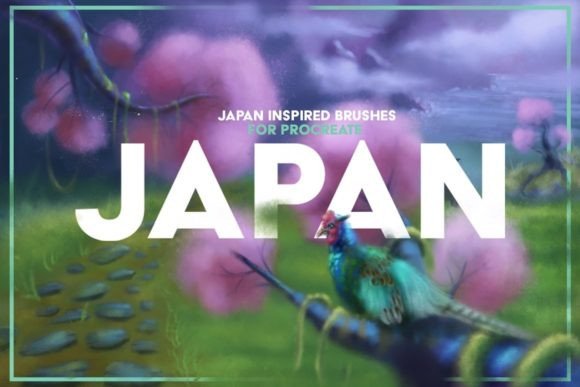
Mastering Authentic Asian Aesthetics with Japan Procreate Brushes
The digital art landscape has evolved significantly, moving beyond simple replication of traditional media to creating entirely new visual languages that honor historical techniques. For artists seeking to capture the delicate nuance, organic texture, and spiritual depth of East Asian art, standard digital tools often fall short. This is where specialized toolsets like JAPAN PROCREATE BRUSHES become indispensable. These tools are not merely filters; they are engineered simulations of centuries-old artistic practices, adapted for the modern iPad workflow. By integrating authentic stroke dynamics with high-fidelity textures, these brushes allow creators to bridge the gap between ancient tradition and contemporary digital convenience.
The Fusion of Tradition and Digital Precision
Traditional Japanese art forms, such as Sumi-e (ink wash painting) and Ukiyo-e (woodblock prints), rely heavily on the interaction between natural materials. The absorbency of rice paper, the viscosity of ink, and the flexibility of bamboo brushes create unpredictable, beautiful results that are difficult to mimic digitally. Standard round brushes in most software lack the "tooth" and variation required to replicate this feel. The Japan Procreate Brushes 5 Old paper textures included in this specific collection address this deficit by providing a holistic ecosystem. It is not just about the stroke; it is about how that stroke interacts with the surface beneath it.
This set includes 15 AUTHENTIC Japan inspired brushes designed to respond to pressure, tilt, and speed in ways that mirror physical tools. When an artist uses a watercolor brush from this pack, the digital pigment behaves like real water-based paint, pooling, drying, and bleeding according to the virtual paper's texture. This level of simulation allows for a more intuitive creative process, where the artist focuses on expression rather than fighting against the software’s default smoothness.
Comprehensive Toolset Breakdown
Understanding the components of this toolkit is essential for maximizing its potential. The collection is divided into distinct categories, each serving a specific artistic function. The inclusion of Japan Dry 1.brush, Japan Dry 2.brush, and Japan Dry 3.brush provides artists with tools for creating textured, gritty effects. These are particularly useful for adding depth to backgrounds, simulating charcoal or dry ink effects, and creating rough outlines that evoke the feeling of hand-drawn sketches on coarse paper.
The core of the collection lies in its watercolor simulation. With brushes labeled Watercolor A.brush through Watercolor L.brush, users have access to a wide spectrum of fluid dynamics. Each variant offers different levels of opacity, flow, and edge hardness. For instance, Watercolor J Smudge.brush is specifically designed for blending and softening edges, a critical technique in traditional wash painting where gradients must be seamless. Meanwhile, brushes like Watercolor A and Watercolor B might offer sharper, more defined strokes suitable for detailed botanical illustrations or precise line work.
Beyond the brushes themselves, the package includes five high-resolution old paper textures. These are provided in a .psd format, allowing for layer manipulation and blending mode adjustments within Procreate. The textures range from aged, yellowed parchment to rough, fibrous rice paper. Applying these textures as overlay layers transforms a sterile digital canvas into a tangible-looking artifact, grounding the artwork in a sense of history and materiality.
Versatile Applications Across Creative Industries
The utility of JAPAN PROCREATE BRUSHES extends far beyond traditional landscape painting. Their versatility makes them suitable for a wide array of professional and hobbyist projects. For illustrators working in children’s literature, these brushes offer a soft, approachable aesthetic. The watercolor variants can create gentle, dreamlike scenes that appeal to young audiences, while the dry brushes can add playful, sketchy elements to character designs.
In the realm of comic and graphic novel creation, the ability to switch between sharp ink lines and textured fills is crucial. The dry brushes can simulate the halftone patterns or screen tones often found in manga, while the watercolor brushes can be used for atmospheric backgrounds or emotional color grading. This eliminates the need for external texturing software, streamlining the production pipeline for comic artists.
Fashion designers and concept artists also benefit from this toolkit. The organic nature of the brushes allows for quick, expressive sketching of fabric flows and textures. The watercolor brushes can simulate silk, chiffon, or washed cotton, providing a realistic representation of material weight and drape without the rigidity of vector lines. Furthermore, the inclusion of brushes specifically suited for Japan style lettering opens up opportunities for typographic design, logo creation, and poster art that requires an authentic Eastern aesthetic.
Technical Workflow and Installation
To ensure optimal performance, it is important to understand the technical requirements and installation process. These brushes are exclusively designed for Procreate on the iPad. They leverage the Apple Pencil’s pressure sensitivity and tilt recognition to deliver their unique characteristics. Consequently, they DO NOT WORK IN PHOTOSHOP or ILLUSTRATOR. Attempting to use them in other software will result in incompatibility errors, as the file structure is specific to Procreate’s brush engine.
Installation is straightforward but requires attention to detail. Users download the .ZIP FILE containing the Japan Procreate Brushes and Textures Japan Paper Textures.psd. On the iPad, navigating to the Files app and tapping on the zip file will preview its contents. By selecting the individual .brush files, such as Japan Dry 1.brush or Watercolor K.brush, Procreate will automatically import them into the current brush library. It is recommended to create a new brush set within Procreate to keep these tools organized and easily accessible.
Once installed, using the brushes is intuitive. Artists simply select the desired brush, choose the paint tool, and begin drawing. The color and width of the strokes can be adjusted easily via the on-screen sliders. However, the true magic happens when experimenting with opacity and flow settings. Lowering the opacity on watercolor brushes allows for building up layers of color, mimicking the glazing technique used in traditional painting. Adjusting the size pressure curve can help achieve finer control over line variation, essential for calligraphic strokes.
Enhancing Realism with Texture Integration
The inclusion of Old paper textures is a critical component of achieving authenticity. Digital art often suffers from a "too clean" look, lacking the imperfections that make traditional art compelling. By importing the Textures Japan Paper Textures.psd file into a Procreate project, artists can place these textures on a top layer. Setting the layer blend mode to "Multiply," "Overlay," or "Soft Light" allows the texture to interact with the underlying artwork. This adds grain, fiber details, and subtle discoloration that breaks up uniform digital colors.
For best results, artists should experiment with the opacity of the texture layer. A subtle hint of paper grain can add warmth to a portrait, while a heavy, rough texture can enhance the dramatic effect of a stormy landscape. The five included textures provide variety, allowing users to match the paper type to the subject matter. For example, a smoother paper texture might be appropriate for delicate flower illustrations, while a rougher, aged paper suits bold, expressive ink splashes.
Considerations for Professional Use
While these brushes are powerful, they require a shift in mindset from standard digital painting. Traditional digital brushes often rely on perfect symmetry and uniformity. JAPAN PROCREATE BRUSHES embrace irregularity. Artists must learn to let go of control and allow the brush to behave naturally. This means accepting unexpected bleeds, dry spots, and texture variations as part of the artistic process rather than errors to be corrected.
Additionally, because these brushes are highly detailed, they may require more processing power than simple round brushes. Ensuring the iPad is updated to the latest version of Procreate and closing unnecessary apps can help maintain smooth performance, especially when working with large canvases and multiple texture layers. It is also worth noting that these brushes are optimized for the Apple Pencil. While compatible styluses may work, the nuanced pressure response required for authentic watercolor effects is best achieved with the native Apple hardware.
In conclusion, this collection offers a robust solution for artists seeking to infuse their digital work with the soul of traditional Japanese art. By combining specialized brush engines with high-quality textures, it provides a comprehensive toolkit for a wide range of creative applications. Whether for illustration, design, or personal exploration, these tools enable a deeper connection to the materiality of art, even in a fully digital environment.