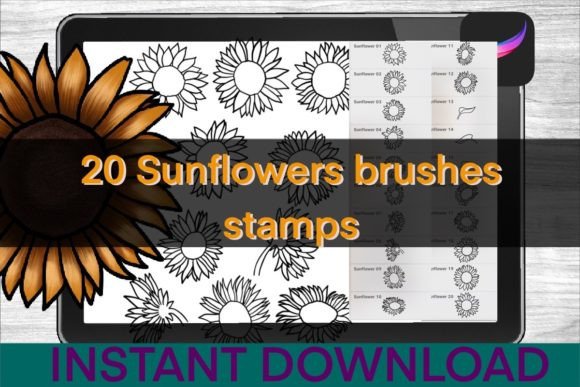
Enhancing Digital Botanicals with Sunflower Brushes Procreate Stamps
Digital illustration has evolved from a niche hobby into a robust professional workflow for designers, educators, and content creators. Within this ecosystem, the efficiency of asset creation often determines the viability of a project timeline. For artists working on the iPad, Sunflower Brushes Procreate Stamps represent a targeted solution to a common challenge: rendering complex botanical details without sacrificing hours to manual rendering. This set is not merely a collection of clipart; it is a functional toolset designed to integrate seamlessly into the Procreate environment, offering a balance between artistic control and time-saving automation.
The core value proposition of this brush set lies in its specificity. While general floral brushes exist in abundance, few focus exclusively on the structural nuances of the sunflower. The set includes twenty distinct stamps, covering both the iconic flower heads and the accompanying foliage. This distinction is crucial for realistic composition, as the interplay between the vibrant petals and the textured leaves defines the visual authenticity of botanical art. By providing these elements as pre-rendered stamps, the tool allows users to focus on composition, lighting, and color grading rather than the repetitive task of drawing individual petals or leaf veins.
Technical Composition and Asset Quality
When evaluating digital brushes, the primary metric is often resolution and transparency handling. The Sunflower Brushes Procreate Stamps are engineered to maintain high fidelity when scaled. Each stamp is created with careful attention to edge softness, ensuring that when placed on a canvas, they do not appear as rigid cutouts. Instead, they blend naturally with underlying layers, allowing for effective use of blending modes such as Multiply or Overlay. This technical consideration is vital for professionals who need to composite these elements into larger scenes, such as wedding invitations, packaging designs, or editorial illustrations.
The set comprises twenty unique stamps, strategically divided between flowers and leaves. This variety prevents the "copy-paste" look that plagues lower-quality brush sets. In practical application, this means an artist can construct a dense sunflower field or a delicate bouquet without visible repetition. The inclusion of separate leaf stamps is particularly noteworthy. Many floral sets neglect foliage, forcing artists to source leaves from disparate packs, which often results in inconsistent lighting directions and stylistic clashes. By providing a cohesive unit of flowers and leaves, this set ensures visual harmony across the entire composition.
Workflow Integration and Usability
For freelancers and small business owners, time is a non-renewable resource. The primary advantage of using Sunflower Brushes Procreate Stamps is the acceleration of the drafting phase. Consider a marketer creating social media graphics for a seasonal campaign. Manually painting a realistic sunflower might take thirty to forty minutes per instance. With these stamps, the base structure is established in seconds, allowing the creator to spend that saved time on typography, layout, and brand consistency. This shift from creation to curation significantly enhances productivity.
Furthermore, the flexibility of the Procreate app amplifies the utility of these stamps. Once a stamp is placed, it remains fully editable. Users can adjust hue, saturation, and brightness to match specific color palettes. They can warp, distort, or flip the images to create natural variation. This level of control ensures that the final output does not look like a generic template but rather a custom-designed piece. For educators creating teaching materials, this means they can quickly generate diverse examples of plant life without needing advanced illustration skills, making complex biological concepts more visually accessible to students.
Installation and Technical Requirements
Understanding the technical prerequisites is essential for a smooth user experience. The Sunflower Brushes Procreate Stamps are designed exclusively for the Apple ecosystem. To utilize this tool effectively, users must have an iPad, an Apple Pencil or compatible stylus, and the Procreate app installed. It is important to note that these are not standard image files but specialized brush files formatted for Procreate’s engine. Therefore, they will not function in other digital art software such as Photoshop or Clip Studio Paint without significant conversion efforts.
The installation process, while straightforward, requires attention to detail to avoid common errors. Upon purchase, users receive zipped files. These must be unzipped before they can be imported into the app. The following steps outline the standard procedure for iOS devices:
- Download the Files: After completing the purchase, download the provided zip file to your iPad’s Files app.
- Locate the Archive: Open the Files app and navigate to the “Downloads” folder, or the specific location where your browser saves files.
- Unzip the Content: Tap on the zipped file once. The iOS system will automatically extract the contents into a new folder with the same name.
- Import to Procreate: Open the newly created folder, select the brush file (usually ending in .brushset), and tap the share icon or select “Open in.” Choose Procreate from the list of available apps.
- Verify Installation: Open Procreate and check the Brush Library. The new sunflower stamps should appear in a dedicated set, ready for immediate use.
This process ensures that the brushes are correctly registered within the app’s database. Failure to unzip the file prior to import is a common mistake that can lead to corrupted installations or missing assets. By following these steps, users guarantee that the Sunflower Brushes Procreate Stamps function as intended, with all twenty variants accessible and organized.
Practical Applications Across Industries
The versatility of this brush set extends beyond traditional digital painting. For publishers and bloggers, these stamps offer a quick way to create custom headers, dividers, and decorative elements that align with autumnal or nature-themed content. Unlike stock photography, which can feel impersonal and may carry licensing restrictions, these digital stamps allow for complete customization. A blogger can change the color of the sunflower to match their brand identity, ensuring a cohesive visual language across their platform.
In the realm of product design, particularly for print-on-demand services, these brushes provide a foundation for creating unique patterns. Designers can scatter the sunflower stamps across a canvas, adjust their opacity, and add texture overlays to create fabric prints, wallpaper designs, or stationery. The high resolution of the stamps ensures that the final printed product retains clarity and detail, meeting the quality standards expected by consumers. For entrepreneurs selling handmade goods, incorporating these digital elements into packaging design can elevate the perceived value of the product without the cost of hiring a custom illustrator for every iteration.
Limitations and Considerations
While Sunflower Brushes Procreate Stamps offer significant advantages, they are not a substitute for foundational drawing skills. Users should recognize that stamps are static elements. They do not dynamically respond to pressure sensitivity in the same way a standard paint brush does. Therefore, achieving a truly organic look requires manual adjustment. Artists must be prepared to rotate, scale, and recolor individual stamps to avoid a repetitive, tiled appearance. Additionally, because these are pre-rendered images, they may not suit projects requiring extreme close-ups where pixelation could become visible if scaled beyond their native resolution.
Another consideration is the learning curve associated with layer management. Effective use of these stamps requires a solid understanding of Procreate’s layering system. Users must know how to mask, clip, and blend layers to integrate the stamps seamlessly into their artwork. For beginners, this may require a period of experimentation and tutorial viewing. However, for those with intermediate knowledge of digital art tools, the integration is intuitive and immediate.
Long-Term Value and Conclusion
Investing in specialized digital tools like Sunflower Brushes Procreate Stamps is a decision based on long-term workflow efficiency. For professionals who frequently incorporate botanical elements into their work, the time saved over months of use far outweighs the initial cost. The set’s focus on realism and variety ensures that it remains relevant across different projects and seasons. Whether used for commercial design, educational content, or personal artistic exploration, these brushes provide a reliable, high-quality resource that enhances the creative process.
Ultimately, the value of this tool lies in its ability to bridge the gap between artistic vision and practical execution. By handling the intricate details of sunflower anatomy, it frees the creator to focus on the broader narrative of their piece. For iPad artists seeking to refine their botanical illustrations or streamline their design workflow, this set offers a pragmatic, professional-grade solution that delivers consistent, aesthetically pleasing results.