Enhancing Digital Art with Fur Photoshop Brushes
Digital illustration has evolved significantly over the past decade, moving from flat vector styles to highly textured, photorealistic compositions. One of the most challenging aspects of this transition is rendering organic textures, particularly animal fur. Achieving a realistic look for long, short, thick, or thin hair strands manually can be time-consuming and technically demanding. This is where specialized tools like Fur Photoshop Brushes become essential assets in a digital artist’s toolkit. By streamlining the process of creating complex textural details, these brushes allow creators to focus more on composition and lighting rather than getting bogged down in repetitive stroke work.
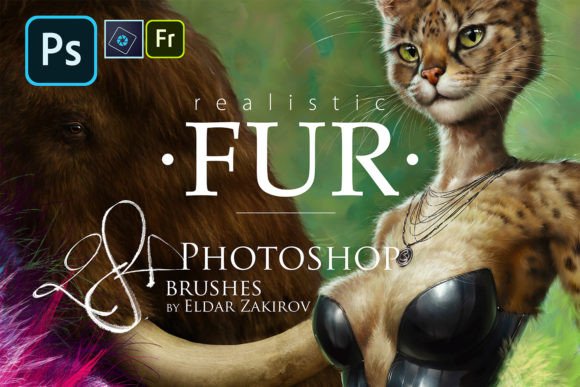
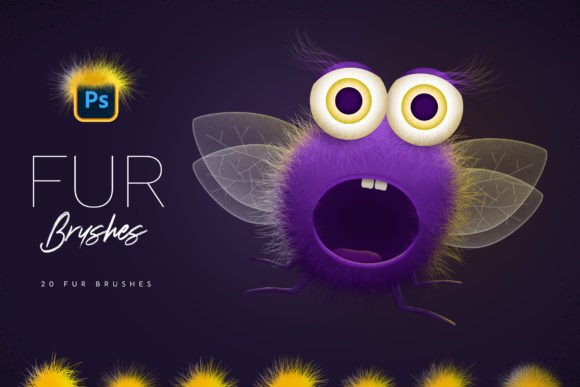
The collection known as Fur Photoshop Brushes offers twenty distinct brush presets designed specifically for drawing various types of fur. For professionals and serious hobbyists alike, the value of such a resource lies not just in the immediate visual result, but in the workflow efficiency it provides. Whether you are illustrating a fantasy creature, retouching a pet portrait, or adding subtle texture to a character design, having a reliable set of fur brushes can drastically reduce production time while maintaining high artistic standards.
Core Features and Versatility
The primary strength of this brush set is its versatility. The package includes twenty different Photoshop brushes, each engineered to mimic specific fur characteristics. This variety is crucial because fur is not a uniform texture; it varies significantly depending on the animal, the body part, and the grooming style. Some brushes are optimized for short, dense coats, ideal for animals like cats or bears, while others are designed for long, flowing strands suitable for horses or mythical creatures.
One notable feature is the ease of customization. While the brushes come pre-configured for immediate use, they are fully adjustable via Photoshop’s brush settings panel. By pressing F5, users can modify spacing, scattering, size jitter, and angle dynamics. This flexibility ensures that the brushes do not produce repetitive, stamped-looking patterns. Instead, artists can tweak the parameters to match the specific direction and density of the fur in their artwork. This level of control is vital for maintaining a natural, organic appearance in professional-grade illustrations.
Furthermore, the brushes are designed to be responsive to different input methods. They perform well whether used with a graphics tablet pen or a standard mouse. For tablet users, pressure sensitivity can be leveraged to vary the thickness and opacity of individual strokes, adding depth and realism. For those using a mouse, the brushes’ inherent shape dynamics still provide a convincing texture, making the tool accessible to a broader range of users regardless of their hardware setup.
Practical Application and Workflow Integration
In a real-world workflow, the utility of Fur Photoshop Brushes extends beyond simple painting. A powerful technique involves using the "Stroke Path" function. Artists can create a vector path along the desired direction of the fur growth and then apply the brush along that path. This method ensures consistent flow and directionality, which is often difficult to achieve with freehand strokes alone. It is particularly effective for rendering mane hair, tails, or the sleek coat of a horse, where the direction of the hair follows a predictable pattern.
The ability to achieve a "cool fluffy effect" easily is another significant advantage. Traditional methods of painting fur often involve layering hundreds of individual lines, a process that can clutter the file and slow down performance. These brushes consolidate that effort into fewer, more impactful strokes. This efficiency is beneficial for freelancers and small business owners who need to deliver high-quality results within tight deadlines. It allows for quicker iterations and faster client approvals, as adjustments can be made by simply altering the brush stroke rather than repainting entire sections.
However, it is important to note that these brushes are tools, not magic solutions. Their effectiveness depends heavily on the artist’s understanding of light, shadow, and anatomy. Using the brush without considering the underlying structure of the animal can result in a flat or unnatural appearance. Therefore, these brushes are best viewed as accelerators for skilled artists rather than replacements for fundamental drawing knowledge. When combined with proper shading techniques, they produce highly convincing results that enhance the overall realism of the piece.
Installation and Technical Setup
Accessibility and ease of installation are key factors when evaluating digital assets. The Fur Photoshop Brushes set is designed for straightforward integration into Adobe Photoshop on both PC and Mac systems. The process is user-friendly and does not require advanced technical knowledge.
- Download the file to your local computer.
- Locate the file named Fur_Brushes_by_Sko4.abr.
- Double-click the .abr file, or alternatively, drag and drop it directly into the Photoshop interface.
- Photoshop will automatically install the brushes, and they will appear in your brush list.
- Press F5 to open the Brush Settings panel and customize the behavior of each brush to suit your specific project needs.
This seamless installation process ensures that artists can start working immediately without navigating complex folder structures or manual configuration files. It reflects a user-centric design approach that respects the creator’s time and minimizes friction between downloading the asset and utilizing it in a live project.
Who Benefits Most from This Tool?
The target audience for Fur Photoshop Brushes is diverse, ranging from professional illustrators to educators and serious hobbyists. Concept artists working in the gaming or film industry will find these brushes invaluable for rapid prototyping of creature designs. The ability to quickly visualize different fur types allows for faster exploration of ideas during the early stages of development.
Freelance graphic designers and marketers who create content for social media or advertising campaigns can also benefit. High-quality, textured images tend to engage audiences more effectively than flat graphics. By incorporating realistic fur elements, creators can produce more compelling visuals for pet-related products, wildlife conservation campaigns, or fantasy-themed promotions.
Educators and tutorial creators may use these brushes to demonstrate texturing techniques to students. The clear distinction between different brush types makes them excellent teaching aids for explaining how texture varies across different surfaces. Additionally, bloggers and publishers who require custom illustrations for articles can use these tools to create unique, copyright-safe images that enhance their written content.
Evaluating Long-Term Value and Limitations
When assessing the long-term value of Fur Photoshop Brushes, consistency and reliability are paramount. Unlike some free resources that may lack coherence or quality control, this set offers a standardized level of performance across all twenty brushes. This consistency allows artists to build a reliable workflow, knowing that the tools will behave predictably across different projects.
However, there are limitations to consider. As with any specialized brush set, there is a learning curve associated with mastering the specific nuances of each preset. Users may need to experiment with different combinations of spacing and scattering to achieve the desired effect. Additionally, while the brushes are versatile, they may not cover every possible fur type imaginable. Highly stylized or abstract interpretations of fur may require additional manual editing or custom brush creation.
Another consideration is software compatibility. These brushes are designed for Adobe Photoshop. Users of other digital painting software, such as Procreate, Clip Studio Paint, or Krita, will need to convert the .abr files or find equivalent tools, which may not offer the exact same performance. Therefore, this tool is most valuable for those already embedded in the Adobe ecosystem.
In conclusion, Fur Photoshop Brushes represent a practical and efficient solution for digital artists seeking to enhance their texturing capabilities. By offering a diverse range of fur effects, easy customization options, and a straightforward installation process, this tool set addresses a common pain point in digital illustration. While it requires a foundational understanding of artistic principles to use effectively, it significantly reduces the time and effort required to render realistic fur. For professionals, freelancers, and dedicated hobbyists looking to streamline their workflow and improve the quality of their organic textures, this collection is a worthwhile addition to their digital arsenal.