Mastering Digital Texture: A Guide to the 28 Realistic FUR Brushes for Adobe Photoshop
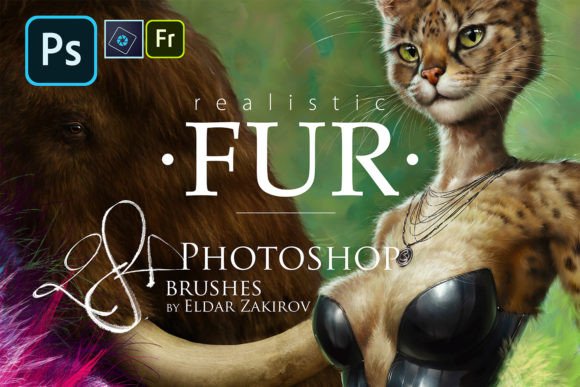
In the expansive world of digital art, few textures are as challenging—or as rewarding—to master as fur. Whether you are illustrating a majestic lion, designing an original character with wolf-like features, or simply adding a touch of warmth to a cozy scene, the ability to render hair convincingly can elevate your artwork from good to extraordinary. For many artists, the struggle lies not in the concept, but in the execution. Painting individual strands of hair is time-consuming and often results in stiff, unnatural-looking coats. This is where specialized tools come into play. The 28 Realistic FUR Brushes for Adobe Photoshop, created by Eldar Zakirov, represent a significant leap forward for digital painters seeking efficiency without sacrificing quality.
Why Specialized Fur Brushes Matter in Digital Art
To understand the value of this brush set, one must first appreciate the complexity of rendering fur. Fur is not a solid surface; it is a collection of thousands of individual fibers that interact with light, shadow, and movement. In traditional media, artists might use fine liners or dry brush techniques to achieve this effect. In digital software like Adobe Photoshop, Photoshop Elements, and Adobe Fresco, the default round brushes rarely capture the organic chaos of animal coat textures.
General-purpose brushes often produce uniform strokes that look "digital" or plastic. This breaks the immersion for the viewer. Specialized fur brushes, such as those found in the Realistic FUR 2015-2020 Brush Set (Rel.3.0), are engineered to mimic the natural clumping, tapering, and flow of hair. They allow artists to block in large areas of texture quickly and then refine details with precision. This workflow shift is crucial for professional illustrators who need to meet deadlines while maintaining high artistic standards.
The Evolution of the Set: From Concept to Rel.3.0
This particular collection is not just a random assortment of tools; it is the result of iterative improvement and practical application. The set includes 20 brushes remastered from the first FUR brush set, alongside 8 entirely new brushes. This evolution highlights a commitment to usability. The creator, Eldar Zakirov, developed these tools through long and multiple work processes, testing them in real-world scenarios to ensure they perform reliably under various painting conditions.
The compatibility of these brushes is another key feature. While they were tested in minimal versions starting from Photoshop CS, the .abr format file ensures compatibility with earlier Photoshop versions as well. This broad accessibility means that whether you are using the latest Creative Cloud subscription or an older standalone version of Photoshop, you can integrate these tools into your workflow seamlessly. Furthermore, their functionality extends to Adobe Photoshop Elements and Adobe Fresco, making them versatile for tablet users and desktop artists alike.
Breaking Down the 28 (Actually 31) Brushes
At first glance, the package promises 28 brushes. However, a closer inspection reveals a thoughtful design choice that adds extra value. Brushes 2, 3, and 8 depict fur from a side view and come with two options each: one for left-growing hair and one for right-growing hair. This distinction is vital for anatomical accuracy. Animals do not have hair that grows in a single direction; it flows around muscles and bones. By providing directional variants, the set effectively offers 31 unique brushing options.
- Remastered Classics: The 20 updated brushes provide a reliable foundation for general fur textures, suitable for everything from short dog coats to longer, shaggier breeds.
- New Additions: The 8 new brushes expand the versatility of the set, likely addressing specific texture needs that were missing in the original release, such as finer details or different hair densities.
- Directional Variants: The inclusion of left and right growth options for specific brushes allows for symmetrical painting without the need to constantly flip canvases or adjust brush angles manually.
This attention to detail demonstrates an understanding of the painter’s workflow. Instead of forcing the artist to fight against the tool, the brushes adapt to the natural growth patterns of the subject.
Practical Applications: Who Benefits from This Set?
The utility of the Realistic FUR Brushes extends beyond just painting dogs and cats. Here are several contexts where these tools prove invaluable:
- Animal Portraiture: For wildlife artists, capturing the essence of a creature often relies on the texture of its coat. These brushes help in rendering the softness of a rabbit’s fur or the coarseness of a bear’s hide.
- Character Design and Furries: The anthropomorphic character community, often referred to as "furries," relies heavily on expressive fur designs. Original characters (OCs) with unique color patterns and hair styles benefit greatly from brushes that can handle complex layering and shading.
- Fantasy Creatures: Dragons, griffins, and other mythical beasts often feature wooly or fluffy elements. These brushes can be adapted to create scales that look soft or feathers that blend into fur.
- Textile and Object Rendering: Beyond animals, fur brushes are excellent for painting fluffy objects like teddy bears, rugs, or winter clothing. The underlying mechanics of the brush stroke mimic fiber optics, making them useful for any fibrous material.
Installation and Usage Tips
Acquiring the tools is only the first step; knowing how to use them effectively is where the true learning curve lies. When you purchase or download the Realistic FUR 2015-2020 Brush Set by Eldar Zakirov, you receive more than just the .abr file. The package includes a PDF guide titled "How to install and Some useful tips.pdf" and a visual reference list named Realistic-FUR-4-PS-Brush-List.jpg.
Having a visual brush list on hand is a practical tip that experienced digital artists swear by. It allows you to quickly identify which brush corresponds to which number without having to test them all individually during a project. The PDF guide provides essential installation instructions, ensuring that even beginners can get started without technical hurdles.
Best Practices for Natural-Looking Fur
To get the most out of these brushes, consider the following best practices:
- Layering is Key: Do not try to paint the entire coat in one layer. Start with a base color, use the fur brushes to add mid-tone texture, and then use smaller, sharper brushes for highlight strands.
- Follow the Anatomy: Always paint in the direction of hair growth. Use the directional variants (left/right) to match the contour of the animal’s body. For example, fur on the chest usually flows downward, while fur on the legs may flow upward or outward depending on the pose.
- Vary Pressure and Opacity: If you are using a graphics tablet, leverage pressure sensitivity. Light strokes create soft, translucent fur, while heavier presses create dense, opaque clumps. Varying opacity helps blend the fur into the skin or underlying layers naturally.
- Color Variation: Real fur is rarely one solid color. Use the brushes with slightly varied hues to create depth. A dark brown base with lighter tan highlights will look much more realistic than a flat brown coat.
Conclusion: Elevating Your Digital Toolkit
The 28 Realistic FUR Brushes for Adobe Photoshop are more than just a convenience; they are a testament to the power of specialized digital tools. By addressing the specific challenges of rendering hair and fur, this set allows artists to focus on creativity rather than getting bogged down in tedious manual detailing. Whether you are a beginner looking to improve your animal portraits or an experienced illustrator seeking to streamline your workflow for character design, this brush set offers a robust solution.
With its compatibility across multiple Adobe platforms, continuous improvements through version updates, and thoughtful inclusion of directional variants, the Realistic FUR 2015-2020 Brush Set stands out as a valuable resource. By integrating these tools into your practice and following the included tips, you can achieve a level of realism and fluency in your digital paintings that was once difficult to attain. Embrace the texture, respect the anatomy, and let these brushes help you bring your fluffy creations to life.