The Monster Procreate Brushes: Texture & Color
For digital artists, the gap between a flat screen and the tactile feel of traditional media is often the hardest hurdle to clear. We spend hours searching for that perfect grit, the right amount of bleed, or the subtle imperfection that makes an illustration feel alive. This is where The MONSTER PROCREATE BRUSHES step in, offering a curated solution for creators who value authenticity without sacrificing the convenience of digital workflows. This set is not just a collection of tools; it is a bridge between classic illustration techniques and modern iPad creativity.
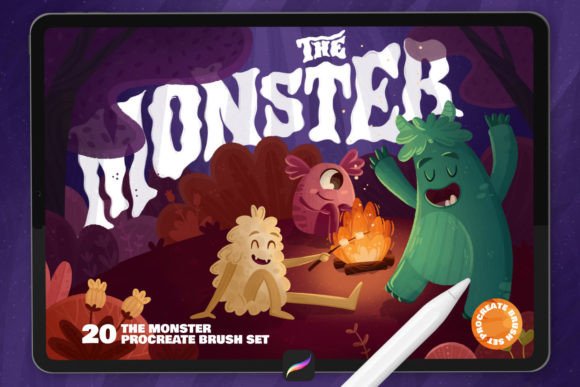
Designed with versatility in mind, this pack includes 20 authentic textured illustration-inspired brushes and five carefully crafted color palettes. Whether you are a children’s book illustrator looking to add warmth to your characters, a lettering artist seeking organic strokes, or a comic creator needing reliable halftone effects, these tools provide the foundation for distinctive visual storytelling. The emphasis here is on usability and results, allowing you to focus less on technical setup and more on the art itself.
Why Texture Matters in Digital Illustration
In an era where digital art can sometimes appear overly polished or sterile, texture serves as a vital element of human connection. It introduces noise, grain, and variation that mimic the physical world. The Monster Procreate Brushes leverage the pressure sensitivity of the Apple Pencil to replicate these natural behaviors. When you press harder, the texture deepens; when you lighten your touch, the stroke becomes delicate and airy. This dynamic response is crucial for maintaining an organic feel in your work.
For children’s book illustrators, this capability is invaluable. Young readers respond to visuals that feel approachable and handcrafted. A rigid, vector-like line can feel cold, whereas a textured brushstroke invites the eye to linger. These brushes allow you to create environments that feel lived-in and characters that feel tangible. The set includes specific tools designed to handle the nuances of retro-style illustrations, giving your work a nostalgic quality that resonates with both parents and children.
Versatility Across Creative Disciplines
While the initial appeal might be for illustrators, the utility of this brush set extends far beyond character design. The inclusion of pressure-sensitive brushes makes them exceptionally suitable for hand lettering and typography. Lettering artists often struggle to find digital brushes that mimic the drag and friction of ink on paper. With this set, you can adjust the width and color of strokes easily, creating custom typographic pieces that retain the energy of hand-drawn calligraphy.
Comic artists and graphic novelists will also find significant value in the halftone capabilities included in the pack. Halftones are essential for creating depth and shading in black-and-white or limited-color comics. Instead of manually placing dots, which is time-consuming and prone to inconsistency, these brushes allow you to paint shadows and textures directly. This speeds up the workflow significantly while maintaining a professional, print-ready aesthetic.
Marketers and social media content creators can use these tools to break through the noise of generic stock imagery. By incorporating textured elements into promotional graphics, you create a unique brand voice that stands out. Whether you are designing Instagram posts, eBook covers, or blog headers, the retro and organic styles offered by these brushes add a layer of sophistication and originality that template-based designs often lack.
Enhancing Workflow with Curated Color Palettes
A great brush is only half the equation; color theory plays an equally critical role in the success of an illustration. Recognizing this, The MONSTER PROCREATE BRUSHES include five beautiful color palettes specifically designed to complement the textured brushes. These palettes are not random assortments of hues but thoughtfully constructed groups that ensure harmony in your projects.
For educators and hobbyists who may not have extensive training in color theory, these swatches provide a safety net. They allow you to experiment with confidence, knowing that the colors you choose will work well together. This is particularly useful for rapid prototyping or when working on tight deadlines. You can spend less time mixing colors and more time refining composition and narrative.
It is important to note that while the brushes are exclusive to Procreate, the color palettes are versatile. The .swatches files included in the download work in Photoshop as well. This means that if your workflow involves moving between iPad sketching and desktop refinement, you can maintain color consistency across platforms. This cross-platform compatibility adds significant value for freelancers and designers who utilize multiple software ecosystems.
Practical Application and Technique
Using these brushes is intuitive, designed to fit seamlessly into your existing Procreate workflow. To begin, simply choose a brush from the set, select the paint tool, and start drawing. The learning curve is minimal because the brushes behave predictably. However, to get the most out of them, consider experimenting with opacity and flow settings. Lowering the opacity can create layered, translucent effects that build depth gradually, while adjusting flow can control how quickly the texture builds up on the canvas.
For best results, keep your layers organized. Use separate layers for line work, base colors, and textured shading. This non-destructive approach allows you to tweak individual elements without affecting the entire piece. If you are creating a children’s book, you might use one layer for the clean outlines and another for the textured fills, giving you the flexibility to adjust the intensity of the texture independently from the line weight.
Consistency is key when working on larger projects like comics or illustrated books. Stick to a limited subset of brushes from the pack to maintain a cohesive visual style throughout your work. Jumping between too many different textures can make the final product feel disjointed. By mastering a few key brushes from the set, you develop a signature style that becomes recognizable to your audience.
Technical Requirements and Installation
Before purchasing, it is crucial to understand the technical constraints of this product. These brushes are ONLY for Procreate and are designed for use with the Apple Pencil or a compatible stylus. They do not work in Photoshop, Illustrator, or other desktop software. This limitation ensures that the brushes are optimized for the specific engine of Procreate, delivering the highest performance and responsiveness on iPad.
The installation process is straightforward. After downloading the .zip file, preview the content to locate the TheMonsterBrushes.brushset file. Tap on it, and Procreate will automatically import the brushes into your library. The five color palettes, saved as .swatches files, can be imported similarly into your Procreate palette library. For Photoshop users, the .swatches files can be loaded directly into the Swatches panel.
If you encounter any issues during installation, ensure that your Procreate app is updated to the latest version. Older versions may not support the latest brush formats or features. Once installed, take a moment to explore each brush individually. Test them on a blank canvas to understand their unique characteristics, such as how they react to tilt and pressure.
Joining the Creative Community
Art is meant to be shared, and the creators behind The Monster Procreate Brushes encourage users to showcase their work. If you love the brushes or the creations you have made with them, do not hesitate to share your process and results. Video tutorials and demonstrations, such as the one available on YouTube, can provide further inspiration and technique tips. Seeing how other artists interpret and utilize these tools can spark new ideas for your own projects.
Whether you are a seasoned professional looking to refresh your toolkit or a beginner eager to explore digital illustration, this set offers a robust foundation for creative growth. It balances the charm of traditional media with the efficiency of digital art, empowering you to create work that is both visually striking and emotionally resonant. By integrating these textured brushes and curated palettes into your workflow, you open up new possibilities for expression, ensuring that every project you undertake carries a distinct, authentic voice.