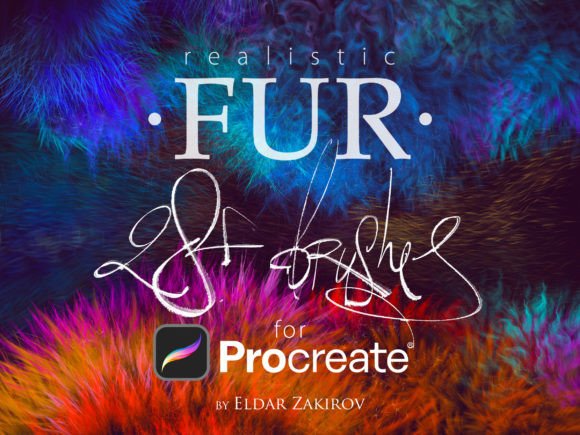
Realistic FUR Brushes for Procreate
In the evolving landscape of digital illustration, texture is not merely an afterthought; it is a fundamental pillar of visual storytelling. For artists and designers aiming to create lifelike characters or immersive environments, the ability to render organic materials with precision is paramount. This is where the Realistic FUR Brushes for Procreate set becomes an indispensable tool in your creative arsenal. Designed specifically for version 5 and above, this collection bridges the gap between conceptual sketching and polished, professional-grade artwork.
Elevating Digital Illustration with Texture
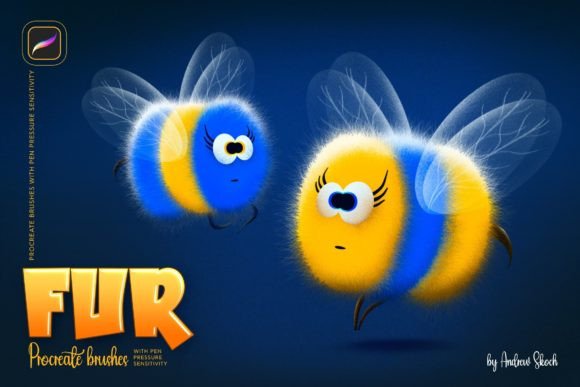
The demand for high-quality, realistic textures in graphic design and digital art has never been higher. Whether you are developing original characters for a narrative project, designing assets for game development, or creating engaging social media graphics, the tactile quality of your work influences how audiences perceive it. The 28 Realistic FUR Brushes for Procreate offer a sophisticated solution for painting animals, furries, and other wooly creatures. By providing nuanced control over hair growth direction and density, these brushes allow for a level of detail that standard tools often lack.
From a professional design perspective, consistency and usability are key. This set includes twenty remastered brushes from the original collection, alongside eight entirely new additions. What sets this package apart is its attention to directional flow. Brushes 2, 3, and 8 feature dual options for left and right hair growth, effectively expanding the utility of the set to thirty-one distinct functional tools. This thoughtful design ensures that your workflow remains uninterrupted, allowing you to focus on composition and visual hierarchy rather than fighting against the software.
Practical Applications in Modern Design
While often associated with character art, the versatility of realistic fur textures extends into various areas of commercial and creative design. Integrating these assets can significantly enhance the depth and appeal of your projects.
- Branding and Logo Design: For brands focusing on nature, pets, or luxury textiles, incorporating realistic fur elements can strengthen brand identity and evoke specific emotional responses.
- Social Media Content: Eye-catching visuals drive engagement. Using textured illustrations in your digital marketing campaigns can help your content stand out in crowded feeds.
- Packaging Design: Product packaging benefits immensely from tactile visual cues. Realistic fur renders can suggest softness and quality, influencing consumer perception before purchase.
- Editorial and Web Design: In editorial layouts or UI design, textured accents can break up flat color fields, adding visual interest and guiding the user’s eye through the content.
Optimizing Your Design Workflow
To maximize the potential of these creative assets, it is essential to understand how they integrate into your broader design system. When working with complex textures like fur, maintaining a clear visual hierarchy is crucial. The texture should support the subject, not overwhelm it. Consider the following tips for effective implementation:
- Layer Management: Use separate layers for base colors, shadow, and highlight fur strokes. This non-destructive approach allows for easy adjustments to color palettes and opacity without compromising the underlying structure.
- Lighting Consistency: Ensure that the direction of the fur growth aligns with your light source. The left and right growth options in this brush set are particularly useful for maintaining this consistency across curved surfaces.
- Scale and Resolution: Always test your brushes at the final output size. What looks detailed on a large canvas may appear noisy when scaled down for web design or mobile UI applications.
Furthermore, remember that this product is part of a larger ecosystem of design tools. While you are currently viewing the Procreate version, similar sets are available for Photoshop, Clip Studio Paint, and Affinity Photo. Ensuring you select the correct format for your preferred software is vital for a seamless design workflow. The included PDF guide offers additional tips and notes, serving as a quick reference to keep your creative process efficient.
The Impact of Quality Assets on Brand Communication
In today’s competitive market, the quality of your visual assets directly correlates with the perceived value of your brand. High-resolution, professionally crafted brushes like these enable designers to produce work that meets modern aesthetic standards. Whether you are creating merchandise, advertising campaigns, or digital products, the attention to detail provided by realistic textures can elevate a good design to a great one.
Ultimately, the goal of any design tool is to remove technical barriers and empower creativity. By utilizing specialized resources such as the Realistic FUR Brushes for Procreate, you invest in your ability to communicate more effectively through visual language. Thoughtful design choices, supported by robust creative assets, lead to stronger audience connections and more impactful brand experiences. Embrace these tools to refine your craft and deliver professional presentations that resonate with your target audience.