Procreate Pattern Brushes First Set
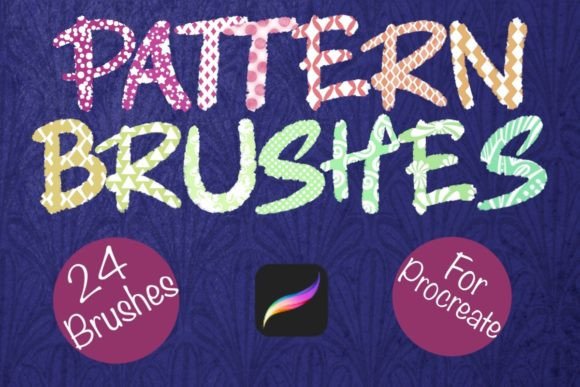
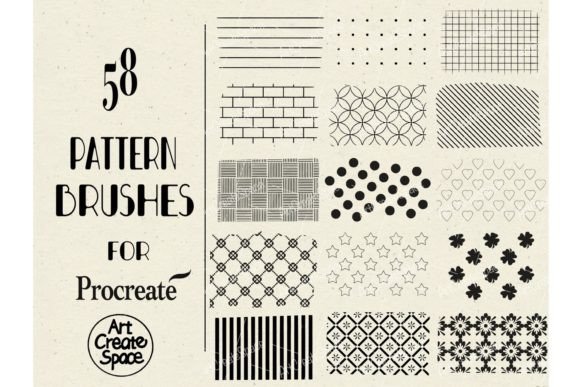
Digital illustration has evolved from a niche hobby into a robust professional workflow, yet one persistent challenge remains for many artists: the time-consuming nature of creating repetitive textures and intricate backgrounds. This is where the Procreate Pattern Brushes First Set transforms the creative process. By offering a curated collection of 58 distinct pattern brushes, this resource allows creators to bypass hours of manual detailing and focus on composition, color theory, and storytelling. Whether you are a graphic designer working on packaging, a surface pattern designer creating textiles, or a hobbyist journaling on your iPad, these tools provide an immediate boost to productivity without sacrificing artistic integrity.
The core value of this brush set lies in its versatility and ease of integration. Delivered as a single .brushset file compressed in a Zip folder, the installation process is streamlined for the modern digital artist. Once imported, these brushes become native tools within the Procreate ecosystem, responding dynamically to pressure, tilt, and speed just like any standard brush. This seamless integration ensures that the patterns feel organic rather than stamped-on, allowing for a level of customization that static images simply cannot match.
Expanding Creative Possibilities with Digital Patterns
Pattern design is often misunderstood as merely decorative filler. In reality, effective patterns establish rhythm, guide the viewer’s eye, and create cohesive visual identities. The Procreate Pattern Brushes First Set opens doors to various applications across multiple industries. For surface pattern designers, these brushes serve as excellent starting points for textile designs, wallpaper concepts, and wrapping paper layouts. Instead of drawing every individual motif by hand, artists can lay down a foundational texture and then manipulate it using Procreate’s powerful transformation and liquefy tools.
Consider the application in branding and marketing materials. Small business owners and entrepreneurs often need to create consistent visual assets for social media, email newsletters, and product packaging. Using these pattern brushes, a marketer can quickly generate unique backgrounds that align with brand colors, ensuring that every post feels distinct yet part of a unified family. The ability to adjust opacity and blend modes means that a single brush stroke can be layered to create complex, multi-dimensional effects that look professionally designed.
For illustrators and concept artists, these brushes offer a shortcut to world-building. Imagine creating a fantasy map, a sci-fi interface, or a detailed interior scene. Rather than spending days rendering brickwork, fabric weaves, or foliage, an artist can use specific pattern brushes to block in these elements rapidly. This approach allows for faster iteration during the conceptual phase, enabling creators to test different visual directions before committing to final details. The result is a more efficient workflow that prioritizes creative decision-making over repetitive manual labor.
Tailoring the Workflow for Different Users
The beauty of the Procreate Pattern Brushes First Set is its adaptability to various skill levels and professional goals. Educators and students can use these tools to teach principles of repetition, symmetry, and scale. By experimenting with different brush settings, learners gain a deeper understanding of how digital tools mimic traditional media while offering unique advantages. Freelancers can leverage these brushes to meet tight deadlines, delivering high-quality work to clients without burning out on tedious tasks.
Publishers and bloggers also benefit significantly from this resource. Creating engaging header images, chapter dividers, or background textures for e-books becomes a straightforward task. The variety within the 58 brushes ensures that content creators can find a style that matches the tone of their writing, whether it is whimsical, minimalist, or ornate. This consistency helps in building a recognizable visual brand, which is crucial for audience retention and engagement in a crowded digital landscape.
It is important to note that these are specialized tools designed exclusively for the Procreate app on iPad with the Apple Pencil. They will not function in Photoshop or other software applications. This specificity ensures that the brushes are optimized for the touch interface and pressure sensitivity of the iPad, providing a natural and responsive drawing experience. Users should ensure they have the latest version of Procreate installed to guarantee full compatibility and access to all features.
Practical Techniques for Best Results
To maximize the potential of the Procreate Pattern Brushes First Set, users should explore the customization options within Procreate. While the brushes come pre-configured for immediate use, adjusting settings such as spacing, jitter, and size variation can yield entirely new looks. For instance, increasing the spacing can turn a dense pattern into a scattered motif, suitable for airy, light-hearted designs. Conversely, reducing spacing creates solid fills ideal for bold, graphic statements.
Layer management is another critical aspect of working with pattern brushes. Instead of applying patterns directly onto the main artwork layer, it is advisable to use separate layers for each pattern element. This non-destructive approach allows for easy adjustments, such as changing the color, opacity, or blend mode of individual patterns without affecting the rest of the composition. Clipping masks can be particularly useful here, enabling artists to confine patterns to specific shapes or text, creating sophisticated typographic effects or masked illustrations.
Color experimentation is key to keeping results fresh and original. While the brushes define the shape and texture, the color palette dictates the mood. Users should not hesitate to experiment with unconventional color combinations or gradient maps to transform standard patterns into something unique. Saving custom palettes alongside frequently used brushes can streamline the workflow further, ensuring that projects maintain a consistent aesthetic throughout the creation process.
Installation and Getting Started
Getting started with your new tools is straightforward. The package includes 58 pattern brushes in .brushset format, compressed in a Zip folder for easy download. Follow these simple steps to integrate them into your creative toolkit:
- Download the .brushset file from your purchase confirmation or library.
- Unzip the folder if necessary, though most devices handle this automatically upon tapping.
- Tap the .brushset file. It should automatically open and import into your Procreate brush collection.
- Locate the new brush set in your Procreate brush library, typically found at the top of the list or in a dedicated folder.
Once installed, take some time to test each brush on a blank canvas. Experiment with different pressures and angles to understand how each pattern behaves. This familiarization phase is crucial for developing muscle memory and intuition, allowing you to use the brushes fluidly during actual projects. Keep your workspace organized by grouping related brushes or favoriting those you use most frequently.
In conclusion, the Procreate Pattern Brushes First Set is more than just a collection of digital stamps; it is a catalyst for creativity and efficiency. By reducing the technical barriers to pattern creation, it empowers artists, designers, and creators to focus on what truly matters: bringing their unique visions to life. Whether you are looking to enhance your professional portfolio, streamline your business assets, or simply enjoy the joy of digital creation, these brushes offer a practical and inspiring solution for modern digital artistry.