Procreate Gel Pen Brushes Palette
Digital illustration has evolved rapidly, moving from simple sketches to complex, textured masterpieces that rival traditional media. For artists working on the iPad, the right tools can make the difference between a flat image and one that breathes with life and depth. The Procreate Gel Pen Brushes Palette offers a specialized solution for creators looking to add distinct texture and shimmer to their work. Specifically designed for detailed applications, these hand-created digital brushes are perfect for creating beautiful furry artwork, adding metallic accents, or incorporating glitter effects without the mess of physical media.
Understanding how to leverage specific brush packs can significantly streamline your workflow. Instead of spending hours configuring standard brushes to achieve a specific gel-like consistency, this pack provides three varied, pre-configured tools ready for immediate use. This article explores how these brushes function, who benefits most from them, and how to integrate them effectively into your digital art process.
Enhancing Texture in Digital Fur and Hair Rendering
One of the most challenging aspects of digital painting is replicating the organic complexity of fur, hair, or fine fibers. Standard round brushes often result in uniform strokes that lack the natural variation found in real-life textures. The Procreate Gel Pen Brushes Palette addresses this by offering brushes engineered to mimic the viscosity and flow of gel pens. This characteristic allows for strokes that start strong and taper off naturally, or build up density with layered applications.
For character designers and illustrators focusing on anthropomorphic animals or realistic pets, these brushes simplify the rendering process. You can build up layers of fur quickly, using the basic glitter gel brush to add subtle highlights that catch the light. The ability to resize these brushes using the brush resize tool in Procreate, or by using the move and resize tool, means you can switch from broad strokes for the undercoat to fine details for individual whiskers without changing tools. This flexibility supports a more intuitive creative flow, allowing you to focus on form and lighting rather than technical adjustments.
Adding Dimension with Metallic and Glitter Effects
Beyond organic textures, modern digital art often requires decorative elements such as jewelry, magical effects, or futuristic materials. The inclusion of metallic and basic glitter gel brushes in this pack provides a straightforward way to introduce these elements. Unlike flat colors, gel-style brushes have a inherent translucency and depth. When applied over a base layer, they create a sense of volume and reflectivity.
Consider a scenario where you are illustrating a fantasy character adorned with gold armor or sparkling accessories. Using the metallic brush from the Procreate Gel Pen Brushes Palette, you can paint highlights that appear raised and reflective. The strength of the blend ink charge can be altered by using the opacity slider and or blend modes, giving you precise control over the intensity of the shine. For a subtle effect, lower the opacity; for a bold, striking highlight, increase it. This level of control ensures that your embellishments enhance the artwork without overwhelming the composition.
Streamlining Color Selection with Included Palettes
Selecting the right colors is often as time-consuming as the painting process itself. A significant advantage of this brush pack is the inclusion of a dedicated Gel Pen colour palette. This curated selection removes the guesswork from choosing hues that complement the gel texture. The colors are chosen to maximize the visual impact of the brushes, ensuring that the metallic and glitter effects appear vibrant and authentic.
For educators and students, having a pre-set palette simplifies the learning process. Beginners can focus on brush technique and color theory application without getting lost in the vast spectrum of the default Procreate library. Professionals benefit from the consistency, knowing that the colors will interact predictably with the brush engines. This integration of tools and colors supports a more efficient workflow, reducing the friction between idea and execution.
Technical Requirements and Compatibility Considerations
Before purchasing or downloading any digital asset, it is crucial to understand the technical environment required for its use. These files are digital brushes that will only work within the Procreate App. To be able to use them you will need an Apple Pencil and the Procreate App installed on an iPad Pro. This will not work without this. Users with Android tablets, Windows devices, or those using alternative drawing apps like Adobe Fresco or Clip Studio Paint will not be able to utilize these specific files.
This limitation is important for freelancers and small business owners who may work across multiple platforms. If your primary workflow involves cross-platform compatibility, you must ensure that your final output stage includes Procreate on an iPad. However, for those already embedded in the Apple ecosystem, these brushes integrate seamlessly into the existing interface.
Installation and Setup Process
Installing custom brushes in Procreate is a straightforward process, but it requires a few specific steps to ensure the files are recognized correctly. To download and install the files you will need a platform to download the files to eg iCloud and a program to be able to unzip the files for eg iZip. Once you have done this the files will then be imported to Procreate within a named folder.
- Download the File: Save the brush pack to your iCloud Drive or Files app.
- Unzip the Archive: Use a utility like iZip or the built-in iOS unzip feature to extract the contents. You should see the .brushset file and the palette file.
- Import to Procreate: Open Procreate, tap on a brush set, and select "Import." Navigate to the extracted files and select the brush set. Repeat for the palette if necessary.
- Organize: Create a named folder within your brush library to keep these tools accessible for future projects.
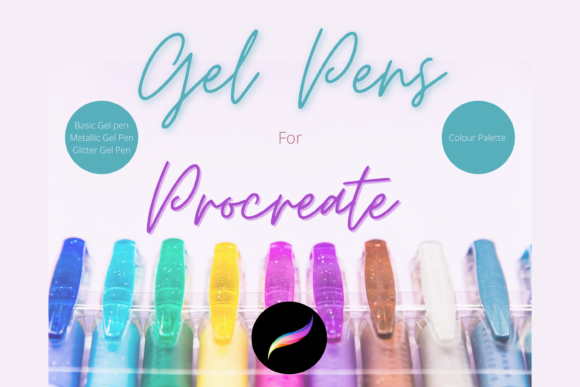
Proper organization ensures that you can locate these specialized tools quickly during intense creative sessions. See listing pictures for more detail of brushes included to verify the visual style matches your artistic needs before installation.
Who Benefits Most from This Brush Pack?
While any digital artist can experiment with new tools, certain groups will find particular value in the Procreate Gel Pen Brushes Palette:
- Character Artists: Those specializing in furry art, anime, or stylized characters will appreciate the texture capabilities for hair and clothing details.
- Illustrators for Children’s Books: The playful nature of glitter and metallic effects suits vibrant, engaging illustrations aimed at younger audiences.
- Hobbyists and Beginners: The included palette and pre-set brushes reduce the technical barrier to entry, allowing new users to achieve professional-looking results faster.
- Freelance Designers: Creating quick, eye-catching social media graphics or logos with metallic accents can be done efficiently using these specialized tools.
It is worth noting that while these brushes excel in specific areas, they are not a replacement for a comprehensive brush library. They are best used as supplementary tools to enhance specific aspects of your artwork. Comparing them against your current workflow can help determine if the specific gel and glitter effects align with your typical project requirements.
Maximizing Creative Potential
To get the most out of the Procreate Gel Pen Brushes Palette, experiment with layer blending modes. Combining the metallic brush with "Overlay" or "Soft Light" modes can create realistic reflections on curved surfaces. Similarly, using the glitter brush on a separate layer with reduced opacity can simulate ambient sparkle in a night scene. These techniques demonstrate how simple tools, when used with knowledge of digital painting principles, can produce sophisticated results.
In conclusion, this brush pack offers a focused, high-quality solution for artists seeking to enhance texture and shine in their digital work. By understanding its capabilities, limitations, and installation requirements, you can integrate these tools effectively into your creative pipeline, saving time and elevating the visual quality of your illustrations.