Mastering Digital Coloring: An Evaluation of Procreate Brush Sets for Adult Artists
The transition from traditional media to digital platforms has transformed how adults approach coloring and illustration. For many, the iPad paired with Procreate has become the standard toolkit, offering a tactile experience that closely mimics physical drawing. However, the software’s default library, while robust, is not always optimized for the specific nuances of coloring sheets. This is where specialized tools like Procreate Digital Coloring Brushes come into play. These curated sets are designed to bridge the gap between rigid line art and expressive shading, providing artists with the texture, transparency, and control necessary for professional-looking results.
Understanding whether a dedicated brush set is a worthwhile investment requires looking beyond marketing claims. It involves evaluating how these tools integrate into your workflow, comparing them against generic alternatives, and determining if they solve specific friction points in your creative process. This analysis explores the utility of such sets, their distinct features, and the practical considerations every digital artist should weigh before downloading.
Defining the Value of Specialized Brush Sets
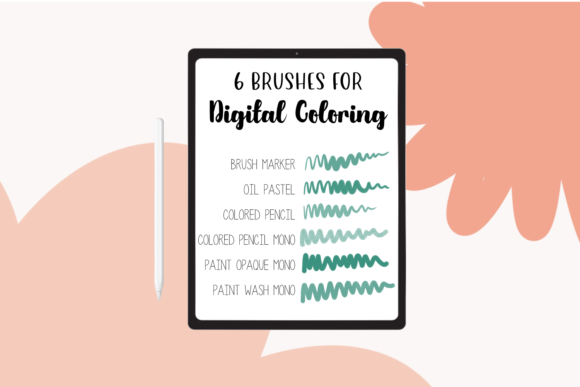
At its core, a set of Procreate Digital Coloring Brushes is a collection of custom-engineered stamp files (.brushset) that alter how the Apple Pencil interacts with the canvas. Unlike standard round brushes, which offer uniform opacity and hardness, specialized coloring brushes are tuned for variation. The set in question includes six distinct brushes contained within a single Procreate file, accompanied by PDF instructions to ensure proper installation and usage.
The primary distinction of these brushes lies in their handling of texture and transparency. Traditional digital coloring can often look flat or "plastic" because the color fills are too perfect. By introducing subtle grain, watercolor-like bleed, or pencil-style roughness, these brushes add organic imperfections that make digital art feel more human. For adults aged 20–50 who may be returning to art after a long hiatus, this immediate access to textured results can significantly boost confidence and reduce the learning curve associated with manual texture creation.
Key Components and Functionality
The variety within a typical high-quality set allows for a layered approach to coloring. Generally, you will find brushes categorized by their intended effect:
- Base Fill Brushes: Designed for covering large areas quickly without leaving harsh streaks.
- Texture Overlays: Used to add depth, such as paper grain or canvas weave, over flat colors.
- Blending Tools: Soft-edged brushes that mimic the smudging effect of charcoal or pastel.
- Detail Liners: High-opacity brushes for refining edges and adding intricate patterns.
The inclusion of PDF instructions is a critical, yet often overlooked, component. Many users encounter issues not because the product is flawed, but because the installation process on iOS can be unintuitive for beginners. Clear documentation ensures that the user can import the .brushset file correctly, avoiding the frustration of missing tools.
Comparing Specialized Sets vs. Default Libraries
A common question among new Procreate users is whether they need third-party brushes at all. The default Procreate library is extensive, containing hundreds of options. However, there are notable tradeoffs when using default tools for coloring sheets specifically.
Default Brushes: These are versatile generalists. A standard "Soft Airbrush" or "Studio Pen" can certainly color a page, but achieving a textured, artistic look requires significant manual effort. You may need to adjust streamline settings, modify opacity manually, or use separate layers for noise effects. This approach offers maximum control but demands higher technical skill and time.
Specialized Coloring Brushes: These are specialists. They are pre-configured to handle the specific dynamics of staying within lines while adding aesthetic value. For instance, a brush might have built-in pressure sensitivity that varies transparency based on how hard you press, simulating real watercolor behavior instantly. The tradeoff here is flexibility; these brushes are optimized for coloring, meaning they might not be suitable for complex concept sketching or graphic design tasks.
For the adult hobbyist or semi-professional illustrator, the decision often comes down to efficiency versus customization. If you color frequently and desire a consistent, polished look with minimal setup, a dedicated set is advantageous. If you prefer tweaking every parameter and enjoy the technical side of digital art, the default library may suffice.
Evaluating Fit: When to Choose This Approach
Determining if Procreate Digital Coloring Brushes are the right fit for your needs depends on your current workflow and artistic goals. Consider the following scenarios:
Ideal Use Cases
- Coloring Book Enthusiasts: If you primarily work with black-and-white line art downloaded from the internet or printed books scanned into your device, these brushes excel. They help fill spaces evenly while respecting the boundaries of the line art.
- Stress Relief and Mindfulness: Many adults use digital coloring as a form of relaxation. The immediacy of textured brushes reduces friction, allowing for a more meditative flow state without getting bogged down in technical adjustments.
- Social Media Content Creation: Artists who share time-lapse videos of their coloring process benefit from brushes that look visually interesting even in motion. Textured strokes appear more dynamic on screen than flat fills.
Potential Limitations
While powerful, these tools are not a panacea. Users should be aware of certain limitations. First, brush sets cannot compensate for poor fundamental technique. Understanding color theory, light sources, and layer management remains essential. Second, relying heavily on preset textures can lead to a homogeneous style if not varied intentionally. Finally, device performance plays a role; highly textured brushes with complex grain sources can sometimes lag on older iPad models, affecting the smoothness of the stroke.
Technical Considerations and Troubleshooting
Digital products, unlike physical goods, require a different approach to quality assurance. One of the most frequent issues users face with downloadable assets is file corruption during transfer. It is important to note that if the files aren’t working after they are downloaded, it is generally an error during the download process rather than a defect in the brush creation itself.
To mitigate this, adopt a rigorous download protocol. Delete all previous downloads from your computer or device and try downloading again, preferably using a stable Wi-Fi connection. Ensure that you are opening the file directly in Procreate or saving it to the "Files" app on iOS before importing. The PDF instructions included in the set should be consulted first, as they often contain platform-specific tips for iOS versions that may have changed interface layouts.
Furthermore, consider the compatibility of your hardware. While Procreate is optimized for Apple Pencil, the pressure sensitivity and tilt recognition vary between iPad models. A brush that feels responsive on an iPad Pro might feel slightly different on an entry-level iPad. Testing the brushes on your specific device is crucial to understanding their true behavior.
Making an Informed Decision
Choosing the right digital resources is about aligning tools with your intent. Procreate Digital Coloring Brushes offer a streamlined path to textured, professional-grade coloring results. They are particularly valuable for those who want to elevate their digital coloring sheets without spending hours configuring custom brush settings.
However, they are part of a broader ecosystem. Before purchasing or downloading, assess your current satisfaction with Procreate’s native tools. If you find yourself constantly adjusting opacity sliders or struggling to achieve a natural look, this set provides a viable solution. If you are already comfortable creating custom textures and prefer total control over every pixel, you may find the preset nature of these brushes restrictive.
Ultimately, the value of any digital asset is measured by how much it enhances your creative enjoyment. For many adults seeking a balance between artistic expression and ease of use, integrating a specialized brush set into their workflow offers a compelling upgrade. By understanding the strengths, limitations, and technical requirements, you can make a choice that supports your artistic journey rather than complicating it.