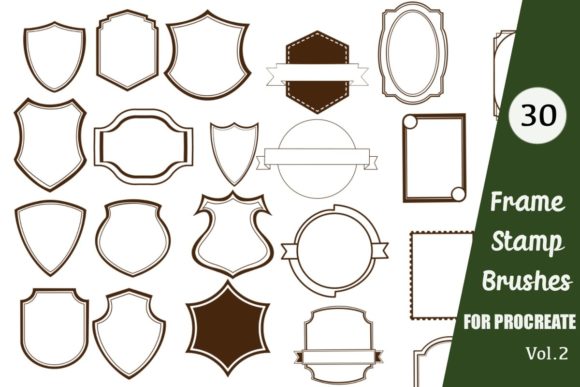
Frame Stamp Brushes and Badges: A Practical Guide for Digital Creators
Digital illustration has evolved from simple sketching to complex design workflows, where efficiency often dictates the quality and volume of output. For artists using the iPad, Frame Stamp Brushes and Badges represent a significant shift in how decorative elements are integrated into artwork. Rather than drawing every border, seal, or ornamental line manually, creators can utilize pre-designed digital stamps to accelerate their workflow. This approach is particularly relevant for those working within Procreate, where brush sets offer a seamless way to add structure and elegance to digital projects.
Understanding the utility of these tools requires looking beyond the aesthetic appeal. While Elegant Frame Stamps and Line Frame Brushes certainly enhance visual presentation, their primary value lies in consistency and time management. This article evaluates the role of frame stamp brushes in digital design, exploring their benefits, limitations, and ideal use cases to help you determine if they align with your creative goals.
Understanding Frame Stamp Brushes and Badges
Frame Stamp Brushes are specialized digital tools designed for apps like Procreate. Unlike standard painting brushes that simulate media such as watercolor or charcoal, stamp brushes function more like digital rubber stamps. When you tap the screen with an Apple Pencil or finger, the brush deposits a complete, pre-drawn image—such as a vintage badge, a floral border, or a geometric frame—onto the canvas.
The collection typically includes a variety of styles, from minimalist Line Frame Brushes suitable for modern layouts to intricate Elegant Frame Stamps that evoke classical design. Because these are vector-like raster images within a brush format, they retain clarity when scaled, allowing for flexible application across different project sizes. The core concept is simplicity: instead of building a frame layer by layer, the user selects the stamp and places it with a single tap.
Why Digital Creators Are Turning to Stamp Brushes
The interest in Frame Stamp Brushes and Badges stems from the growing demand for high-quality digital assets in various industries. Content creators, educators, and small business owners often need to produce visual materials quickly without sacrificing professional standards. Here are several reasons why these tools have gained traction:
- Efficiency in Workflow: Drawing complex frames or badges from scratch can take hours. Stamp brushes reduce this process to seconds, allowing artists to focus on composition and color rather than repetitive line work.
- Consistency in Branding: For those creating logos, worksheets, or social media templates, maintaining a consistent style is crucial. A curated set of stamps ensures that every frame or badge shares the same line weight and aesthetic tone.
- Accessibility for Non-Illustrators: Not every designer is a skilled hand-letterer or illustrator. Stamp brushes allow individuals with strong layout skills but limited drawing ability to incorporate sophisticated decorative elements into their work.
Benefits and Practical Applications
The versatility of Frame Stamp Brushes and Badges Frames makes them suitable for a wide range of applications. Their utility extends beyond simple decoration, serving functional roles in design hierarchy and user engagement.
Digital Stickers and Planner Elements
One of the most popular uses for these brushes is the creation of digital stickers. By combining frame stamps with text or small illustrations, users can generate unique assets for digital planners. The ability to change opacity and color means a single black-and-white stamp can be transformed into a pastel accent or a bold highlight, maximizing the value of the brush set.
Educational Worksheets and Printables
Educators and resource creators often rely on structured layouts to guide student attention. Line Frame Brushes For iPad provide clean, unobtrusive borders that define sections of a worksheet without overwhelming the content. These frames can be resized to fit specific text boxes or problem sets, ensuring a polished look for printable PDFs.
Branding and Logo Design
While custom logo design usually requires bespoke vector work, Elegant Frame Stamps can serve as excellent starting points or complementary elements for small businesses. A badge stamp can house a monogram or brand name, creating an instant emblem for social media profiles or packaging labels. However, it is important to note that for trademarked logos, unique modification is essential to avoid generic appearances.
Considerations and Tradeoffs
While the convenience of Frame Stamp Brushes and Badges is evident, there are tradeoffs to consider. Understanding these limitations helps manage expectations and ensures the tool is used effectively.
Lack of Unique Customization: Since these are pre-made assets, other users may have access to the same designs. If uniqueness is a primary goal, relying solely on stock stamps can result in work that looks similar to others. To mitigate this, artists should modify the stamps by changing colors, adding textures, or combining multiple stamps to create new compositions.
Software Limitations: It is crucial to recognize that these brushes are compatible with Procreate only. They do not function in Adobe Photoshop, Illustrator, or Clip Studio Paint unless converted into separate PNG files, which defeats the purpose of the dynamic brush functionality. Users invested in other ecosystems will need to seek alternative solutions.
Resolution Constraints: Although stamp brushes can be scaled, they are raster-based. Excessive enlargement beyond their original resolution may result in pixelation. Users must be mindful of the canvas size and the intended output resolution to maintain crisp edges.
When to Use Frame Stamp Brushes vs. Alternatives
Deciding whether to invest in Frame Stamp Brushes and Badges Frames depends on your specific project needs and workflow preferences.
Choose Frame Stamp Brushes if:
- You work primarily in Procreate on an iPad.
- You need to produce high volumes of content, such as daily social media posts or educational materials.
- You prefer a tactile, immediate workflow over menu-heavy design processes.
- You want to add decorative elements without learning advanced vector illustration techniques.
Consider Alternatives if:
- You require fully scalable vector graphics for large-format printing (consider Adobe Illustrator).
- You need absolute uniqueness for trademarked branding (consider hiring a custom illustrator).
- You work across multiple software platforms and need asset portability (consider purchasing PNG clipart packs instead of brush sets).
Making the Decision: Aligning Tools with Goals
Integrating Frame Stamp Brushes and Badges into your toolkit is a strategic decision. For many digital artists, the time saved on repetitive drawing tasks allows for greater creative exploration in other areas, such as color theory and composition. The ease of use—simply downloading the .brushset file, importing it, and tapping the screen—lowers the barrier to entry for sophisticated design.
However, the true value emerges when these tools are used as a foundation rather than a final product. By adjusting opacity, layering different stamps, and integrating hand-drawn elements, creators can transform standard frames into unique artistic statements. Whether you are designing a digital sticker pack, structuring a classroom worksheet, or refining a brand identity, these brushes offer a practical balance between speed and aesthetics.
Ultimately, the decision to use Elegant Frame Stamps and Line Frame Brushes should reflect your workflow priorities. If efficiency and ease of use on the iPad are paramount, these brushes provide a robust solution. By understanding their capabilities and limitations, you can leverage them to enhance your digital artworks while maintaining the integrity and uniqueness of your creative vision.