Mastering Digital Textiles: A Deep Dive into Stitch Photoshop Brushes
In the evolving landscape of digital art and graphic design, texture is often the difference between a flat, lifeless image and a piece that breathes with realism. For designers working on fashion mockups, scrapbooking layouts, or intricate character illustrations, the ability to replicate the tactile quality of fabric and thread is invaluable. This is where specialized tools like Stitch Photoshop Brushes come into play. Rather than spending hours manually painting individual threads or searching for stock photos that never quite fit the perspective, artists can now integrate high-quality stitching effects directly into their workflow with just a few clicks.
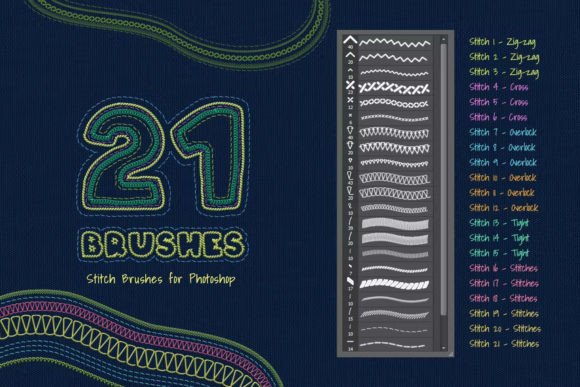
The core appeal of this specific brush set lies in its versatility and ease of use. When you download the package, you receive an .ABR file containing 21 distinct brushes designed for Adobe Photoshop. These aren't just generic lines; they are meticulously crafted to mimic real-world sewing techniques. Whether you are aiming for the rugged look of denim seams or the delicate finish of haute couture embroidery, these brushes provide the necessary visual language to convey materiality.
Understanding the Brush Set Composition
To truly leverage these tools, it is essential to understand what is included in the collection. The set comprises 21 unique stamps and patterns, each serving a specific aesthetic purpose. Upon installation, users gain immediate access to a variety of stitch types, including:
- Zig-zag stitches: Ideal for finishing edges on knit fabrics or creating decorative borders.
- Cross stitches: Perfect for adding a handmade, crafty feel to illustrations or backgrounds.
- Overlock stitches: These mimic the serged edges found in professional garment construction, adding an industrial yet polished touch.
- Simple running stitches: The backbone of sewing, useful for basting lines, visible mending aesthetics, or subtle textural details.
Alongside the functional .ABR file, the package includes example files in .JPG format. These previews are crucial for quick reference. Instead of trial-and-error testing every brush on a blank canvas, designers can glance at the examples to identify exactly which brush corresponds to the desired effect. This streamlines the creative process, allowing for faster decision-making during tight deadlines.
Technical Compatibility and Accessibility
One of the most significant advantages of this brush set is its broad compatibility. In an industry where software updates frequently render older plugins obsolete, these Stitch Photoshop Brushes maintain relevance across a wide spectrum of versions. They are fully compatible with Adobe Photoshop CS3 all the way through to Photoshop CC2020. This backward and forward compatibility ensures that whether you are using a legacy system in a print shop or the latest Creative Cloud subscription on a modern tablet, the brushes will function as intended.
Furthermore, the barrier to entry is remarkably low. The technical requirements state clearly that no prior drawing skills are required. This is a pivotal feature for graphic designers, web developers, or hobbyists who may not possess traditional illustration abilities. The brushes are designed to do the heavy lifting regarding texture and form. You do not need to understand the physics of thread tension or the intricacies of needlework to produce convincing results. The tool democratizes the creation of textile textures, making high-end visual effects accessible to everyone.
Workflow Integration: The Power of Stroke Path
For those who worry about their hand-eye coordination or steady-hand capabilities, the "Stroke Path" feature in Photoshop is a game-changer. This function allows users to create perfect, smooth lines without the jitteriness often associated with mouse or tablet input. Here is how you can integrate these brushes into a professional workflow using this technique:
- Create a Vector Path: Use the Pen Tool to draw the shape or line where you want the stitch to appear. This could be the seam of a jacket in a fashion illustration or the border of a digital invitation card.
- Select Your Brush: Choose one of the 21 stitch brushes from your brush panel. Adjust the size and color to match your project’s lighting and scale.
- Apply Stroke Path: Right-click on your path and select "Stroke Path." Ensure the tool selected is "Brush." Photoshop will then automatically apply the stitch pattern along the vector line.
This method ensures that every curve and angle is precise. It is particularly useful for technical drawings, logo designs involving fabric elements, or any project requiring geometric accuracy. The result is a clean, professional-looking stitch that follows the exact contour you defined, eliminating the frustration of freehand inconsistencies.
Practical Applications in Modern Design
The utility of Stitch Photoshop Brushes extends far beyond simple decoration. In modern design workflows, these tools serve critical functions across various industries.
Fashion and Apparel Mockups
Fashion designers and e-commerce store owners frequently need to present digital mockups of clothing items. Realistic stitching is a key indicator of quality in these visuals. By using overlock and zig-zag brushes, designers can simulate the construction details of garments, helping clients visualize the final product more accurately. This reduces the need for physical prototypes in the early stages of design, saving time and resources.
Digital Scrapbooking and Stationery
The handmade aesthetic remains popular in digital stationery and scrapbooking. Cross-stitch and simple running stitch brushes add a layer of warmth and nostalgia to digital layouts. They break up the sterility of pixel-perfect designs, introducing an organic element that resonates with viewers on an emotional level. These brushes allow creators to produce printable kits or digital journals that feel personal and crafted.
UI and Web Design Elements
In user interface design, subtle textures can guide user attention or define sections without heavy borders. A faint stitch line can separate content areas in a lifestyle app or add a thematic touch to a brand’s website that focuses on artisanal goods. The simplicity of the brush set allows for lightweight assets that do not bog down page load speeds, unlike high-resolution photographic textures.
Maximizing Realism: Tips and Best Practices
While the brushes are easy to use, achieving photorealism requires attention to detail. Here are some observations and recommendations to elevate your work:
Color Variation: Real thread is rarely a single, flat color. To enhance realism, slightly vary the hue and saturation of your brush color. You might choose a shade slightly darker than the fabric for shadows or slightly lighter for highlights. This subtle shift mimics how light interacts with twisted fibers.
Opacity and Flow: Don’t be afraid to lower the opacity of the brush. A stitch that is 100% opaque can look like a sticker placed on top of an image. Reducing opacity allows the underlying fabric texture to show through, integrating the stitch into the material rather than sitting on top of it.
Layer Styles: Utilize Photoshop’s Layer Styles, such as Drop Shadow or Bevel and Emboss, sparingly. A tiny drop shadow can lift the thread off the fabric, creating depth. However, keep these effects minimal to avoid a cartoonish appearance.
Scale Matters: Always consider the resolution of your canvas. A stitch that looks realistic at 300 DPI might look pixelated or overly large at 72 DPI. Test your brush size relative to the overall image dimensions to ensure the proportion remains believable.
Why Choose This Specific Brush Set?
With countless brushes available online, why prioritize this specific collection of 21 stitches? The answer lies in curation and focus. Many free brush packs are bloated with redundant variations or low-quality scans. This set is curated to cover the most essential sewing techniques used in both industrial and home sewing. The inclusion of technical staples like the overlock stitch alongside decorative options like the cross-stitch provides a balanced toolkit.
Moreover, the provision of JPG examples removes the guesswork. Time is a critical resource for professionals, and being able to visually confirm the output before applying the brush accelerates the design process. The combination of technical robustness (compatibility with CS3 to CC2020) and user-friendly features (Stroke Path compatibility) makes this set a reliable asset for both novices and seasoned veterans.
In conclusion, integrating Stitch Photoshop Brushes into your digital arsenal is a strategic move for anyone looking to add tactile depth to their work. It bridges the gap between digital precision and analog warmth, offering a practical solution for a wide array of creative challenges. By understanding the tools, leveraging the Stroke Path function, and applying thoughtful adjustments to color and opacity, designers can create compelling, realistic textile effects that enhance the overall impact of their visual communications.