Mastering Digital Autumn Art: A Guide to Procreate Pumpkin Brushes, Stamps, and Swatches
As the leaves turn crisp and the air grows cooler, digital artists everywhere begin shifting their palettes toward warm oranges, deep browns, and spooky blacks. For creators using the iPad, Procreate has become the industry standard for illustration, offering an intuitive interface that mimics traditional media while unlocking infinite digital possibilities. However, starting a seasonal illustration from scratch can be time-consuming. This is where specialized toolkits, such as a comprehensive Procreate pumpkin brush kit, become invaluable assets for both beginners and seasoned professionals.
This article explores the utility, creative potential, and practical application of digital pumpkin brushes, stamps, and swatches. By understanding how these tools function within the Procreate ecosystem, artists can streamline their workflow, enhance their artistic expression, and create captivating jack-o-lantern designs with ease and speed.
Understanding the Components of a Digital Pumpkin Kit
When you purchase or download a digital product labeled as a "Pumpkin Brush Kit," you are not receiving a physical item. It is crucial to clarify that this is a digital product only, designed specifically for use within the Procreate application on iOS devices. These kits typically bundle several distinct types of digital assets, each serving a unique purpose in the creation process.
1. Pumpkin Brushes
The core of any such kit is the set of custom brushes. Unlike standard round or square brushes, pumpkin brushes are engineered to replicate the organic texture of gourds. They may include:
- Texture Brushes: These add the ribbed, slightly uneven surface characteristic of real pumpkins, saving hours of manual shading.
- Outline Brushes: Designed with variable width to create dynamic, hand-drawn contours that feel natural rather than rigid.
- Stem and Vine Brushes: Specialized tips that mimic the woody, twisted nature of pumpkin stems, adding realism to the top of your design.
2. Pumpkin Stamps
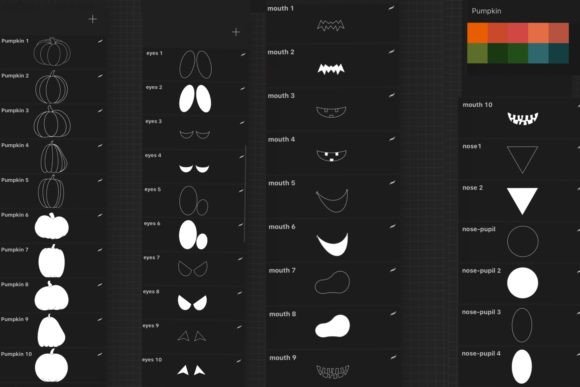
While brushes are for painting, pumpkin stamps are pre-made shapes that can be stamped onto the canvas with a single tap. These are particularly useful for creating backgrounds, patterns, or quick compositions. Instead of drawing five different pumpkins from memory, an artist can stamp three base shapes and then customize them. This feature significantly accelerates the workflow, allowing for rapid prototyping of ideas.
3. Facial Feature Brushes (Eyes, Mouth, Nose)
The soul of any jack-o-lantern lies in its face. Dedicated brushes for eyes, mouth, and nose allow users to carve digital faces instantly. These brushes often come with transparency settings or specific edge hardening to simulate the look of light glowing from within a carved hollow. Whether you want a terrifying grin or a cute, whimsical smile, these specialized tools remove the guesswork from facial symmetry and proportion.
4. Curated Swatches
Color theory can be daunting. A professional kit includes swatches—pre-selected color palettes that harmonize perfectly. These might include various shades of orange, from burnt sienna to bright tangerine, along with complementary shadows and highlights. Using these swatches ensures that your final piece has a cohesive and professional look, eliminating the trial-and-error phase of color selection.
Why Use Specialized Brushes in Procreate?
You might wonder why one should use a specialized kit when Procreate comes with hundreds of default brushes. The answer lies in efficiency and specialization. While default brushes are versatile, they are generalists. A pumpkin brush is a specialist. It understands the curvature of a gourd; it knows how light hits a ribbed surface. By using tools designed for a specific subject, artists can achieve a higher level of detail in a fraction of the time.
Furthermore, these kits help overcome "blank canvas syndrome." For many creatives, staring at an empty white screen is intimidating. Having a library of stamps and shapes provides a starting point. You can drop a pumpkin stamp onto the canvas and immediately begin modifying it, turning a passive activity into an active creative process.
Step-by-Step: Creating Your Own Jack-O-Lantern
To illustrate the practical relevance of these tools, let us walk through a simple creation process. Remember, the pictures with pumpkins often seen in promotional materials are for example only; your results will depend on your unique style and technique.
- Setup: Open Procreate and create a new canvas. Import your Procreate pumpkin brush kit by following the installation instructions provided with the digital download.
- Base Shape: Select a pumpkin stamp from the kit. Tap on the canvas to place your base shape. Resize and rotate it to fit your composition.
- Texturing: Switch to the pumpkin texture brush. Choose a darker orange from the included swatches. Gently brush over the ribs of the pumpkin to add depth and dimension. Use a lighter orange for highlights on the raised areas.
- Carving the Face: Create a new layer above your pumpkin. Select the "Eye" and "Mouth" brushes. Choose a black or dark brown color. Stamp or draw the facial features. Because these are specialized brushes, the edges will look clean and intentional.
- Adding Glow: To make the jack-o-lantern look lit from within, create a new layer below the face but above the pumpkin body. Use a soft airbrush with a bright yellow or orange. Paint behind the eyes and mouth. Change the layer mode to "Add" or "Screen" to create a realistic glowing effect.
- Final Touches: Use the stem brush to add a realistic top. Add a background using additional stamps or gradients from the swatch library.
This process, which could take hours using standard tools, can be completed in minutes with the right kit. This speed is essential for content creators who need to produce timely social media posts, greeting cards, or digital stickers during the busy Halloween season.
Common Misunderstandings and Technical Requirements
It is vital to address a common assumption: compatibility. These brushes are compatible with Procreate only. They will not work in Photoshop, Clip Studio Paint, or other desktop software unless those programs support specific Procreate brush file formats (which is rare). Users must ensure they have an iPad and the Procreate app installed before purchasing.
Additionally, some users assume that using stamps means the art is "cheating" or lacks originality. This is a misconception. Stamps are merely building blocks, similar to how a photographer uses lenses or a writer uses vocabulary. The creativity comes from how you combine, modify, color, and contextualize these elements. Two artists can use the same stamp kit and produce entirely different, unique artworks based on their individual styling choices.
The Broader Impact on Digital Creativity
Beyond Halloween, the use of themed brush kits reflects a broader trend in digital art: the democratization of high-quality design. In the past, creating realistic textures required advanced knowledge of lighting, anatomy, and physics. Today, accessible tools allow educators, small business owners, and hobbyists to produce professional-grade visuals.
For educators, these tools can be used to teach children about digital art fundamentals without the frustration of technical barriers. For small businesses, they enable the quick creation of marketing materials, such as seasonal sale banners or email headers. The ability to create your own jack-o-lantern easily and quickly is not just about convenience; it is about empowering individuals to express themselves visually without needing years of formal training.
Conclusion
A Procreate pumpkin brush kit is more than a collection of digital files; it is a gateway to efficient, enjoyable, and professional-looking seasonal art. By leveraging pumpkin brushes, stamps, facial feature tools, and curated swatches, artists can bypass the tedious aspects of illustration and focus on creativity and fun. Whether you are designing spooky invitations, crafting digital stickers, or simply exploring the joys of autumn-themed art, these tools provide the structure and inspiration needed to bring your vision to life. As technology continues to evolve, such specialized resources will remain essential for anyone looking to navigate the vibrant world of digital illustration with confidence and flair.