Master Blending with 32 Procreate Brushes
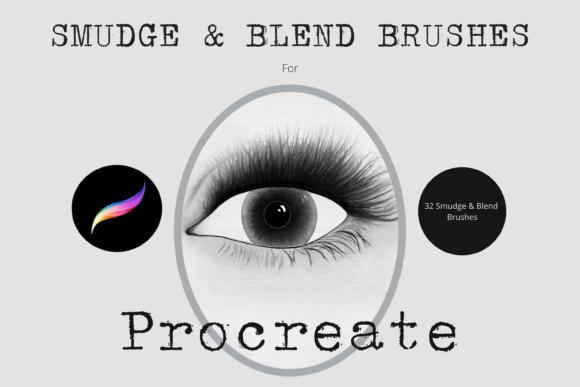
Digital painting often hinges on the transition between colors. The difference between a flat, amateur illustration and a professional piece of art frequently lies in how smoothly hues merge, how textures interact, and how light seems to diffuse across a surface. This is where the right tools become indispensable. The Procreate Blend and Smudge Brushes X 32 pack offers a curated collection of hand-created digital brushes designed specifically to elevate your workflow. These are not just standard smudge tools; they are nuanced instruments that allow for precise control over color mixing, texture retention, and atmospheric depth.
For creators ranging from freelance illustrators to hobbyist painters, understanding how to leverage these brushes can transform a rigid digital sketch into a fluid, organic masterpiece. By integrating these thirty-two unique brushes into your library, you gain the ability to mimic traditional media behaviors while retaining the flexibility and undo capabilities of digital art.
The Power of Controlled Chaos in Digital Art
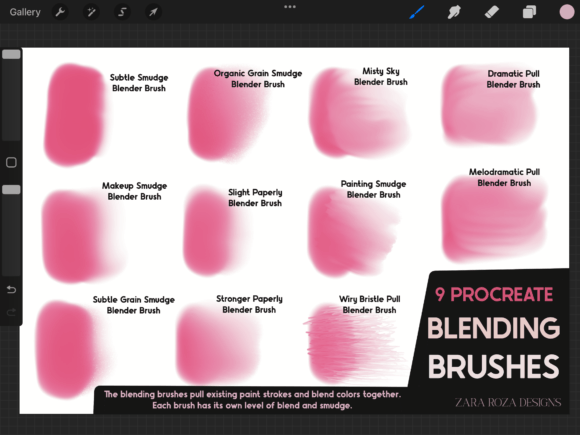
One of the biggest challenges in digital art is overcoming the "clean" look that software naturally produces. Unlike watercolor or oil paint, digital pixels do not bleed or mix unless instructed to do so. Standard smudge tools in Procreate can sometimes feel muddy or destructive, wiping out texture rather than blending it. This brush set addresses that issue by providing varied algorithms for blending. Some brushes in the pack are designed for soft, airbrushed transitions, ideal for skin tones or sky gradients. Others retain more grain, allowing you to blend colors while keeping the tooth of the canvas visible.
The versatility of this pack lies in its diversity. With thirty-two individual options, you are not forced to use a one-size-fits-all approach. You can select a brush that barely moves the pigment for subtle adjustments or one that aggressively mixes colors for bold, abstract effects. This level of choice empowers artists to maintain their unique style while solving specific technical problems during the painting process.
Practical Applications for Various Creators
Different professionals can adapt these tools to meet distinct project requirements. Here is how various users might integrate these brushes into their daily workflows:
- Character Illustrators: When rendering skin, hair, or fabric, smooth gradients are essential. Using the opacity slider in conjunction with these blend brushes allows for building up soft shadows and highlights without harsh lines. This creates a more three-dimensional and lifelike appearance.
- Concept Artists: Speed is crucial in concept design. These smudge brushes enable rapid blocking-in of shapes and values. You can lay down rough color masses and then quickly blend them to establish mood and lighting before adding fine details.
- Graphic Designers: For projects requiring textured backgrounds or custom typography effects, these brushes can create unique distressed looks or soft vignettes that stock filters cannot replicate. This adds a hand-crafted feel to commercial work.
- Educators and Students: Learning color theory is easier when you can physically see colors mix on the canvas. These tools provide an interactive way to understand how complementary colors neutralize each other or how warm and cool tones interact.
Technical Mastery: Opacity and Dilution
To get the most out of the Procreate Blend and Smudge Brushes X 32, it is important to understand the technical settings within Procreate. The brushes are fully resizable, meaning you can use the standard brush resize tool or the move and resize tool to adjust the tip size to fit your canvas dimensions. However, the true magic happens when you manipulate the opacity and dilution settings.
The opacity slider is your primary control for the strength of the blend. Lowering the opacity allows for a gentle, layered approach. This is particularly useful when you want to nudge a color slightly without completely destroying the underlying stroke. It gives you the ability to build up complexity gradually, ensuring that your blends remain transparent and airy rather than opaque and heavy.
A critical note for users wishing to use these brushes for painting as well as blending: check the dilution settings. In some of the brushes included in this pack, the dilution is set quite high. High dilution means the brush picks up more of the existing color on the canvas and mixes it with the new stroke, creating a wet-on-wet effect similar to watercolor. If you are looking for solid coverage, you may need to adjust this setting or switch to a different brush in the set. Understanding this distinction prevents frustration and helps you select the right tool for the specific task at hand.
Creative Project Ideas to Explore
Stuck on how to start? Here are several project ideas that highlight the strengths of this brush collection:
- Atmospheric Landscapes: Create a misty forest or a foggy cityscape. Use the softer blend brushes to diffuse the edges of distant objects, creating aerial perspective. The ability to control the blend strength allows you to make the fog appear thick or thin, adding depth to the scene.
- Impasto Style Portraits: Mimic the look of thick oil paint. Use the brushes with higher texture retention to blend colors while leaving visible brushstrokes. This adds a tactile quality to digital portraits, making them feel more traditional and expressive.
- Abstract Color Studies: Experiment with color harmony by laying down contrasting blocks of color and using the smudge brushes to merge them. Observe how the colors create new intermediate hues. This is an excellent exercise for improving your intuition for color mixing.
- Textured Product Mockups: If you are designing packaging or labels, use these brushes to add realistic wear and tear or soft shadows to your mockups. This helps clients visualize the final product in a real-world context.
Maintaining Consistency and Organization
When working with a large set of brushes, organization is key to maintaining a efficient workflow. It is recommended to keep the Procreate Blend and Smudge Brushes X 32 in a dedicated folder within your brush library. This prevents clutter and allows you to quickly access the right tool without scrolling through unrelated brushes.
Furthermore, consistency in your blending technique helps establish a recognizable style. Try to limit yourself to three or four favorite brushes from the set for a single project. This constraint forces you to master those specific tools and ensures that your artwork has a cohesive look. Jumping between too many different blend modes can result in a disjointed final image where textures clash rather than complement each other.
Remember to save your custom settings. If you find a particular dilution or opacity level that works perfectly for your style, duplicate the brush and save it as a preset. This way, you always have your go-to tool ready, tailored exactly to your preferences.
Expanding Your Digital Toolkit
While this pack of thirty-two brushes is comprehensive, every artist has unique needs. If you find yourself needing more specialized tools, consider exploring additional sets. For instance, if you enjoy the smudge functionality but need finer details for line work or intricate textures, looking into a smaller, more focused smudge blend brush set might be beneficial. Combining different sets allows you to build a versatile toolkit that can handle everything from broad strokes to minute details.
Ultimately, the goal of using tools like the Procreate Blend and Smudge Brushes X 32 is to remove technical barriers between your vision and the screen. By mastering these brushes, you spend less time fighting with the software and more time focusing on composition, color, and storytelling. Whether you are creating content for social media, designing for clients, or simply exploring your creativity, these brushes provide the reliability and flexibility needed to produce high-quality digital art.
Embrace the experimentation process. Test each brush on a separate layer to see how it interacts with your favorite painting brushes. Note which ones work best for soft skies, which are ideal for gritty textures, and which provide the perfect middle ground. This hands-on exploration is the best way to internalize the capabilities of the set and make them an intuitive part of your artistic practice.