Fractal Dust Stamp Brushes: Integrating High-Resolution Textures into Modern Design Workflows
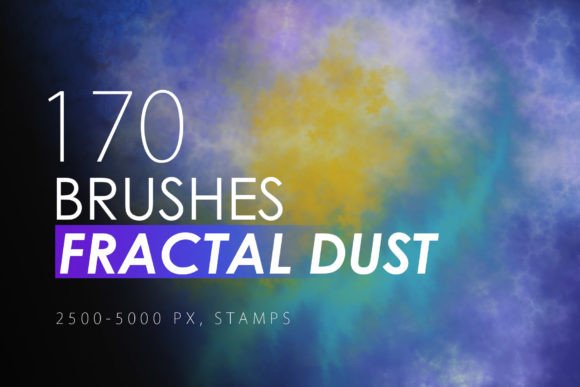
In the landscape of digital design, texture is often the differentiator between a flat, generic composition and a piece that feels tactile, organic, and professionally curated. Fractal Dust Stamp Brushes represent a specific category of asset designed to bridge this gap. This collection comprises 170 different fractal dust Photoshop stamp brushes, engineered for high-resolution output ranging from 2500 to 5000 pixels. For designers working across print, web, and multimedia platforms, understanding how to integrate these assets effectively can significantly streamline the creative process while enhancing visual depth.
The utility of these brushes extends beyond simple decoration. They serve as functional tools for background generation, overlay creation, and compositional balancing. Because they are derived from digitally generated fractals, each stamp offers a unique, non-repeating pattern that avoids the predictable uniformity often found in standard stock textures. This article explores how to incorporate this pack into various professional workflows, ensuring compatibility, efficiency, and high-quality outcomes.
Technical Compatibility and File Preparation
Before integrating any new asset library into a production environment, verifying technical compatibility is essential. This pack is explicitly designed for Photoshop CS6 through CC, covering a wide spectrum of industry-standard versions. However, the utility of the .ABR (Adobe Brush) file format extends far beyond Adobe’s ecosystem. The files are compatible with any software capable of reading .ABR structures, including Affinity Photo and Procreate on iPad. This cross-platform flexibility allows freelancers and agencies to maintain consistent textural libraries regardless of the specific hardware or software preferences of individual team members.
The resolution of these brushes—between 2500 and 5000 pixels—is a critical specification for professional use. High-resolution assets ensure that when scaled for large-format prints such as banners, posters, or trade show displays, the intricate details of the fractal dust do not pixelate or lose definition. For web designers, this means the ability to scale down for retina displays without quality loss, or to crop specific sections for unique UI elements. When preparing your workspace, it is advisable to organize these 170 brushes into logical groups within your brush panel. Given the volume, creating presets based on density, shape complexity, or intended use case can save significant time during active projects.
Strategic Application in Print and Branding Projects
In print design, the challenge is often to create visual interest without overwhelming the primary message. Fractal dust stamps are particularly effective in this context because they mimic natural phenomena like splatters, erosion, or cosmic dust. These organic forms provide a subtle backdrop that adds sophistication to static materials.
- Business Cards and Invitations: Use low-opacity fractal stamps to create textured backgrounds that feel premium to the touch. A subtle dust overlay can break up solid color fields, adding depth without distracting from typography.
- Flyers and Posters: For event promotions, particularly in music or arts sectors, these brushes can be used to create dynamic borders or focal points. Layering multiple fractal shapes with different blend modes can generate complex, custom graphics that appear hand-crafted.
- Packaging and Cases: When designing product packaging or device cases, consistency is key. The high resolution of these brushes allows for seamless tiling or pattern creation. By rotating and scaling the fractal stamps, designers can create continuous patterns that wrap around physical objects without visible seams.
The implementation process here involves careful layer management. Instead of applying the brush directly to the background layer, it is best practice to stamp onto a new layer. This allows for non-destructive editing, where opacity, blending modes, and color overlays can be adjusted independently of the base design. This approach ensures that if client feedback requires a change in intensity or color, the underlying structure of the design remains intact.
Enhancing Digital Interfaces and Web Assets
While fractal textures are traditionally associated with print, their application in digital interfaces is growing. Modern web design trends favor minimalism, but pure minimalism can sometimes feel sterile. Introducing subtle organic textures via Fractal Dust Stamp Brushes can humanize digital spaces.
For website headers and hero sections, a faint fractal dust overlay can add dimension to flat colors, improving visual hierarchy. In app design, these textures can be used to differentiate sections or create custom icons. Because the brushes are high resolution, they can be downscaled for mobile interfaces, retaining crisp edges and fine details. When using these assets for web, consider file size optimization. Exporting textured layers as PNGs with transparency allows developers to overlay them via CSS, maintaining lightweight load times while preserving visual fidelity.
Furthermore, these brushes are valuable for creating social media templates. Content creators who need to produce consistent visual branding across Instagram, LinkedIn, or Pinterest can use specific fractal stamps as signature elements. By standardizing the placement and opacity of these textures, brands can achieve a cohesive look across diverse content types, from quote cards to promotional banners.
Workflow Integration and Efficiency Tips
Integrating a large asset pack like this into a daily workflow requires more than just installation; it demands a strategy for retrieval and application. Here are practical steps to maximize efficiency:
- Curation and Tagging: With 170 different brushes, scrolling through the entire list for every project is inefficient. Spend time initially testing each brush on a blank canvas. Save favorites as tool presets or organize them into sub-folders within the brush panel labeled by style (e.g., "Fine Dust," "Heavy Splatter," "Geometric Fractal").
- Layer Blending Modes: The default "Normal" blending mode rarely showcases the full potential of texture brushes. Experiment with "Overlay," "Soft Light," "Multiply," and "Screen." Each mode interacts differently with the underlying colors, allowing a single black fractal stamp to appear as a highlight, a shadow, or a integrated texture depending on the setting.
- Color Variation: Do not limit the brushes to black or white. Use hue/saturation adjustment layers clipped to the brush stroke to match the brand palette instantly. This ensures that the texture enhances rather than clashes with the overall color scheme.
- Masking for Control: Apply the brush stroke, then use a layer mask to erase parts of the texture. This technique allows for gradual fades and ensures the texture does not interfere with readable text or key visual elements. It provides precise control over where the "dust" settles in the composition.
Quality Control and Consistency Across Teams
For agencies or collaborative teams, maintaining visual consistency is paramount. When multiple designers use the same Fractal Dust Stamp Brushes, establishing usage guidelines prevents disjointed outputs. Define standard opacities, preferred blending modes, and scale ranges for specific project types. For instance, a corporate annual report might require subtle, low-opacity textures, while a concert poster might allow for bold, high-contrast applications.
Additionally, because these brushes are compatible with software like Affinity and Procreate, remote teams or freelancers using different tools can still contribute assets that align with the central design language. This interoperability reduces friction in the handoff process. Whether a designer is sketching concepts on an iPad using Procreate or finalizing layouts in Photoshop CC, the core textural elements remain consistent, ensuring a unified brand identity.
Long-Term Value and Versatility
The investment in a high-quality brush pack pays dividends over time through reusability. Unlike one-off stock photos, brushes are generative tools. They can be combined, rotated, scaled, and colored infinitely. This makes them a sustainable resource for long-term projects. As design trends shift from flat design to more textured, neo-brutalist, or organic aesthetics, having a robust library of fractal textures ensures readiness for evolving client demands.
Moreover, these brushes support educational and personal creative goals. Educators teaching digital art can use them to demonstrate layering techniques and texture integration. Hobbyists can explore pattern making and digital painting with professional-grade tools. The versatility of the 170 fractal shapes means they are not limited to a single niche; they are adaptable components for any creative endeavor requiring depth and organic complexity.
In conclusion, Fractal Dust Stamp Brushes are more than a decorative addition; they are functional assets that enhance the structural integrity of visual designs. By understanding their technical specifications, integrating them thoughtfully into both print and digital workflows, and establishing consistent usage protocols, designers can elevate their output efficiently. The key lies in treating these brushes not as afterthoughts, but as integral elements of the design planning and execution process.