Bringing the Joy of Painting to Your iPad with Bob Ross Inspired Procreate Brushes
There is a specific kind of calm that comes from watching paint blend on canvas. For decades, Bob Ross taught us that painting isn’t about perfection; it is about freedom, relaxation, and making happy little accidents work in your favor. Translating that organic, tactile experience to a digital screen is no small feat, but Bob Ross Inspired Procreate Brushes manage to bridge that gap beautifully. If you have ever felt intimidated by the sterile precision of digital art tools, this brush set offers a way to reclaim the messy, joyful spirit of oil painting without the smell of turpentine or the cleanup.
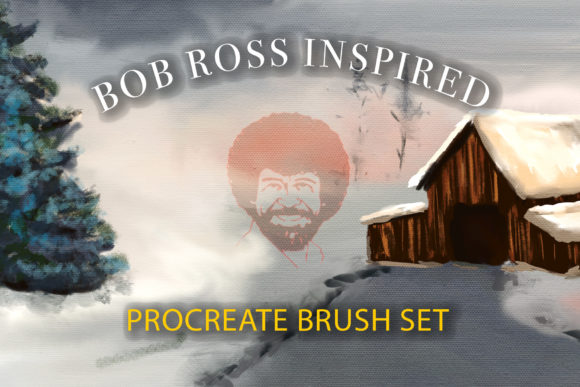
This collection is designed specifically for the iPad, aiming to replicate the retro oil painting medium look that defined an era of television art. It is not just about mimicking the visual output; it is about capturing the feeling of the process. When you use these tools, you are invited to blend with a whisper of a brush stroke or, as Bob would say, beat the dickens out of your blending brush. The result is a digital workflow that feels surprisingly analog, allowing creators to produce light-as-air fluffy clouds and sturdy, textured trees with intuitive ease.
Why Digital Artists Crave Texture and Imperfection
In the world of digital illustration, smoothness is often the default. Vector lines are crisp, and gradients are mathematically perfect. While this has its place, it can sometimes feel cold or impersonal. Many creators, from hobbyists to professional marketers, are increasingly seeking ways to inject warmth and humanity into their digital work. This is where the Bob Ross Inspired Procreate Brush Set becomes an invaluable resource. It introduces controlled chaos through simulated bristle splits, hog hair textures, and palette knife scrapes.
The set includes sixteen distinct brushes, each engineered to solve a specific textural problem. For instance, the Hog Hair and Split Bristle brushes do not just lay down color; they interact with the layers beneath them, creating depth that flat digital strokes often lack. This is particularly useful for artists who want their work to stand out in a feed saturated with polished, hyper-realistic renders. By using tools like the Scratchy Scratchy brush or the Round Synthetic Brush, you can add a layer of authenticity that resonates with viewers on a subconscious level. It signals that a human hand was involved, even if that hand was holding an Apple Pencil.
Practical Use Cases for Creators and Entrepreneurs
You might wonder who actually needs a specialized brush set dedicated to a specific painting style. The answer is broader than you might think. While landscape painters are the obvious beneficiaries, the applications extend into marketing, education, and content creation.
Content Creation and Social Media Branding
For bloggers and social media influencers, standing out requires a unique visual identity. Using the Happy Tree Foliage tapper or the Tiny Fan Brush Grass maker allows you to create custom background elements for posts that feel organic and inviting. Instead of relying on stock photos that everyone else uses, you can generate unique, textured landscapes in minutes. These images stop the scroll because they offer a visual break from the high-gloss aesthetic common on platforms like Instagram and Pinterest. A travel blogger, for example, could use the Bob Ross Inspired Water Streams brush to add artistic flair to their destination guides, creating a dreamy, nostalgic vibe that aligns with the emotional aspect of travel.
Educational Materials and Storytelling
Educators and children’s book illustrators often need visuals that are approachable and soft. The Whisper Mixer Cloud Maker is perfect for creating sky backgrounds that are gentle on the eyes, making them ideal for bedtime story apps or classroom presentations. The ability to quickly generate "happy little trees" means that teachers can create engaging visual aids for geography or nature lessons without spending hours on complex digital painting techniques. The learning curve is low because the brushes do much of the heavy lifting, allowing educators to focus on the narrative rather than the technical execution.
Relaxation and Mental Wellness
Beyond commercial use, there is a significant market for digital art as a form of therapy. Many adults turn to coloring books and digital painting to decompress after work. The Bob Ross Inspired Procreate Brushes are tailored for this exact purpose. The process is designed to be relaxing. When you use the Blend Tool or the Big Palette Knife, the resistance and texture feedback mimic the physical act of painting. This sensory simulation can be meditative. Users report that the act of building up layers of clouds or tapping in foliage helps quiet the mind, offering a digital sanctuary from the noise of daily life.
Understanding the Toolkit: More Than Just Brushes
To get the most out of this set, it is important to understand what is included and how the components work together. The set contains sixteen brushes, including two simulated palette knives—the Big Palette Knife and the Rock Boulder Palette Knife. These are essential for adding highlights and creating the impasto effect, where paint appears thick and raised. They are particularly effective for creating rocky outcrops or reflecting light on water surfaces.
Additionally, the set includes four real canvas overlay image files in JPEG format. These are crucial for achieving the retro oil painting look. Digital screens are inherently flat and backlit, which can make paintings look too clean. By overlaying textures like Unstretched Raw Canvas, Raw Canvas, Toned Canvas Texture, or Stretched Canvas, you introduce the subtle imperfections of physical media. This step transforms a digital file into something that looks like it could hang in a gallery. It grounds the image in reality, providing a tactile quality that pure pixels cannot achieve on their own.
Considerations Before You Start Painting
While these brushes are powerful, they require a shift in mindset if you are coming from a traditional digital art background. Here are a few things to keep in mind to ensure you get the best results.
- Layer Management: Oil painting relies on wet-on-wet techniques. In Procreate, you will need to experiment with layer opacity and blending modes to achieve similar effects. Do not be afraid to merge layers occasionally to allow colors to mix more naturally, just as you would on a physical palette.
- Pressure Sensitivity: These brushes are designed to respond to the pressure of your Apple Pencil. To get the full benefit of the Tree Liner or the Fan Brush, practice varying your pressure. Light touches create whispers of color, while heavier presses deposit dense pigment.
- Canvas Size: High-resolution textures require sufficient canvas size. If you plan to print your work or use it for large displays, ensure your Procreate canvas is set to a high DPI (300 or higher) to maintain the clarity of the canvas overlays and brush textures.
- Patience with Blending: The Blend Tool and Whisper Mixer are subtle. Unlike standard smudge tools that can muddy colors quickly, these require a gentle touch. Take your time to build up gradients, especially when working on skies and water reflections.
Making the Most of Your Digital Studio
The beauty of the Bob Ross Inspired Procreate Brush Set lies in its versatility. It is not limited to landscapes. The Happy Tree Shadows and Schrub Builder can be adapted for creating textured foliage in fantasy illustrations, while the Scratchy Scratchy brush can add grit to urban sketches. The key is experimentation. Try using the palette knives for abstract backgrounds or the cloud makers for dreamy portrait backdrops.
Ultimately, this toolset is an invitation to play. It removes the barrier of technical complexity, allowing you to focus on the joy of creation. Whether you are a freelancer looking to add a unique touch to client projects, a teacher creating engaging materials, or simply someone seeking a peaceful creative outlet, these brushes provide the means to make your digital canvas a happier place. So, load up your iPad, select your favorite canvas texture, and remember: there are no mistakes, just happy accidents waiting to happen.