Evaluating Afro Hair Procreate Brushes for Digital Character Design
Digital illustration has evolved significantly, offering artists specialized tools that streamline complex textures and patterns. Among these tools, Afro Hair Procreate Brushes have emerged as a targeted solution for character designers seeking efficiency and authenticity in rendering textured hair. This article evaluates the utility, compatibility, and practical application of this specific brush set to help digital artists determine if it aligns with their workflow and artistic goals.
Understanding the Toolset
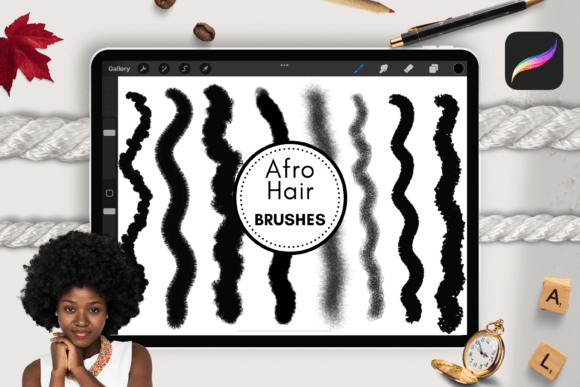
The core function of Afro Hair Procreate Brushes is to simplify the creation of curly and coily hair textures within the Procreate ecosystem. The download features a custom set designed specifically for generating realistic or stylized Afro hair, including dreadlocks and tight curls. Rather than painting each strand individually—a process that can be time-consuming and technically demanding—this toolset provides pre-configured stamps and scattering brushes that mimic the natural volume and structure of textured hair.
The set includes eight distinct Procreate Afro hair brushes. Each brush is engineered to serve a different stage of the hair-rendering process, from establishing base volume to adding definition and stray hairs for realism. By integrating these brushes into a digital workflow, artists can reduce the manual labor associated with hair illustration while maintaining a high degree of visual fidelity.
Compatibility and Technical Requirements
Before considering the acquisition of any digital asset, understanding technical constraints is crucial. Afro Hair Procreate Brushes are exclusively compatible with the Procreate application. This means they are not suitable for other programs such as Adobe Photoshop, Clip Studio Paint, or Corel Painter. Users must ensure their software environment matches the tool’s requirements.
Furthermore, the hardware requirements are specific. To use these brushes effectively, an iPad or iPad Pro is required. More importantly, the functionality relies on the pressure sensitivity and tilt recognition provided by the Apple Pencil. The brushes are not designed for use with capacitive styluses or finger input, as these methods lack the precision necessary for controlling brush opacity, size, and flow. Artists who do not possess an iPad and Apple Pencil combination will find this toolset unusable.
Benefits for Character Designers
The primary advantage of using Afro Hair Procreate Brushes lies in efficiency. Creating realistic curly hair manually requires a deep understanding of light, shadow, and form. For many artists, especially those early in their careers or working under tight deadlines, this can be a bottleneck. These brushes offer a method to bypass the initial structural sketching phase, allowing the artist to focus on composition, color theory, and facial features.
Another significant benefit is consistency. When drawing multiple characters with similar hair types, maintaining a consistent texture can be challenging. A standardized brush set ensures that the curl pattern and density remain uniform across different illustrations. This is particularly valuable for comic artists, game developers, and illustrators working on series where character consistency is paramount.
Additionally, the set supports artistic exploration. By providing a reliable base for curly Afro dreadlocks and other textured styles, the brushes encourage artists to experiment with different hairstyles they might otherwise avoid due to technical difficulty. This can lead to greater diversity in character design portfolios.
Tradeoffs and Considerations
While the efficiency gains are notable, there are tradeoffs to consider. The most significant limitation is the potential for a "generic" look if the brushes are used without modification. Because the brushes rely on pre-set patterns, overuse can result in illustrations that lack unique character. Successful integration requires the artist to customize the brush settings, vary the stroke direction, and manually add imperfections to break up repetitive patterns.
Another consideration is the learning curve associated with layer management. Using stamp-style brushes effectively often requires multiple layers to build depth. Artists must be comfortable with blending modes, clipping masks, and opacity adjustments to ensure the hair integrates naturally with the character’s head shape and lighting environment. Without proper layering techniques, the hair may appear flat or disconnected from the rest of the illustration.
Furthermore, the exclusivity to the Apple ecosystem limits accessibility. Artists who prefer desktop-based workflows or Android tablets cannot utilize this specific tool. This vendor lock-in is a critical factor for professionals who switch between devices or software platforms depending on the project requirements.
Ideal Use Cases
Afro Hair Procreate Brushes are a strong fit for several specific scenarios:
- Rapid Prototyping: Concept artists who need to quickly visualize character designs with various hairstyles can use these brushes to iterate faster than manual painting allows.
- Comic and Webtoon Creation: Artists producing regular content with tight deadlines benefit from the speed these tools provide, ensuring consistent character appearances across multiple panels.
- Beginner Digital Artists: Those struggling with the technical aspects of rendering complex textures can use these brushes as a learning aid, studying how the brushes construct volume and shadow to improve their manual skills over time.
- Stylized Illustration: Projects that favor a semi-realistic or stylized aesthetic rather than photorealism can leverage the decorative quality of the brush strokes.
When to Consider Alternatives
There are situations where alternative approaches may be more appropriate. If an artist aims for hyper-realistic portraiture, relying solely on stamp brushes may not provide the nuanced control needed for individual strand placement. In such cases, custom-built brushes or manual painting techniques might yield superior results.
Additionally, artists who work primarily in vector-based software or desktop applications like Photoshop should look for equivalent tools within their respective ecosystems. Since Afro Hair Procreate Brushes are not cross-platform, investing in them would be inefficient for non-Procreate users.
For those on a budget, it is worth noting that Procreate allows users to create their own custom brushes. Artists with advanced technical skills might prefer to develop their own texture libraries, offering complete control over the output without additional costs.
Making an Informed Decision
Deciding whether to incorporate Afro Hair Procreate Brushes into your workflow depends on your current tools, artistic style, and production needs. If you are an iPad-based Procreate user focusing on character design, this set offers a practical solution for a historically challenging aspect of digital illustration. The inclusion of eight specialized brushes provides enough variety to handle different stages of the rendering process, from base shapes to fine details.
However, success with these tools requires more than just installation. Artists must commit to learning how to blend the brush strokes with manual painting techniques to avoid a repetitive appearance. It is also essential to verify that your hardware setup includes an Apple Pencil, as this is a non-negotiable requirement for optimal performance.
Ultimately, this brush set serves as a facilitator rather than a replacement for artistic skill. It removes technical barriers, allowing creators to focus on expression and design. For those seeking to expand their digital toolkit with efficient, specialized resources for textured hair, this download represents a logical and functional addition. Evaluate your current workflow challenges regarding hair rendering, and consider whether the time saved by using these presets outweighs the need for manual customization in your specific projects.